What is the difference between CAPTCHA and reCAPTCHA?
CAPTCHA is the general idea: an automated test that tells people and bots apart before a form goes through. reCAPTCHA is one CAPTCHA product, made by Google and now part of Google Cloud Fraud Defense. Every reCAPTCHA is a CAPTCHA, but most CAPTCHAs are not reCAPTCHA.
People mix the two up because reCAPTCHA is the CAPTCHA most of them have clicked through. Asking about CAPTCHA vs reCAPTCHA is a bit like asking about search engines vs Google: one is the category, the other is one company’s product in it.
| CAPTCHA (the concept) | reCAPTCHA (Google’s product) | |
|---|---|---|
| What it is | A type of security test | A service run by Google |
| Who makes it | Many providers, or your own code | Google, as part of Google Cloud Fraud Defense |
| What visitors see | Depends on the type: distorted text, an image grid, a checkbox, or nothing | v2: a checkbox, and an image challenge if Google is unsure. v3: nothing |
| Result | Pass or fail, sometimes a score | v2: pass or fail. v3: a score from 0.0 to 1.0 |
| Cost | Depends on the provider | Free up to 10,000 assessments a month per organization, then paid |
| Visitor data | Depends on the provider | Goes to Google; location varies, needs a legal review |
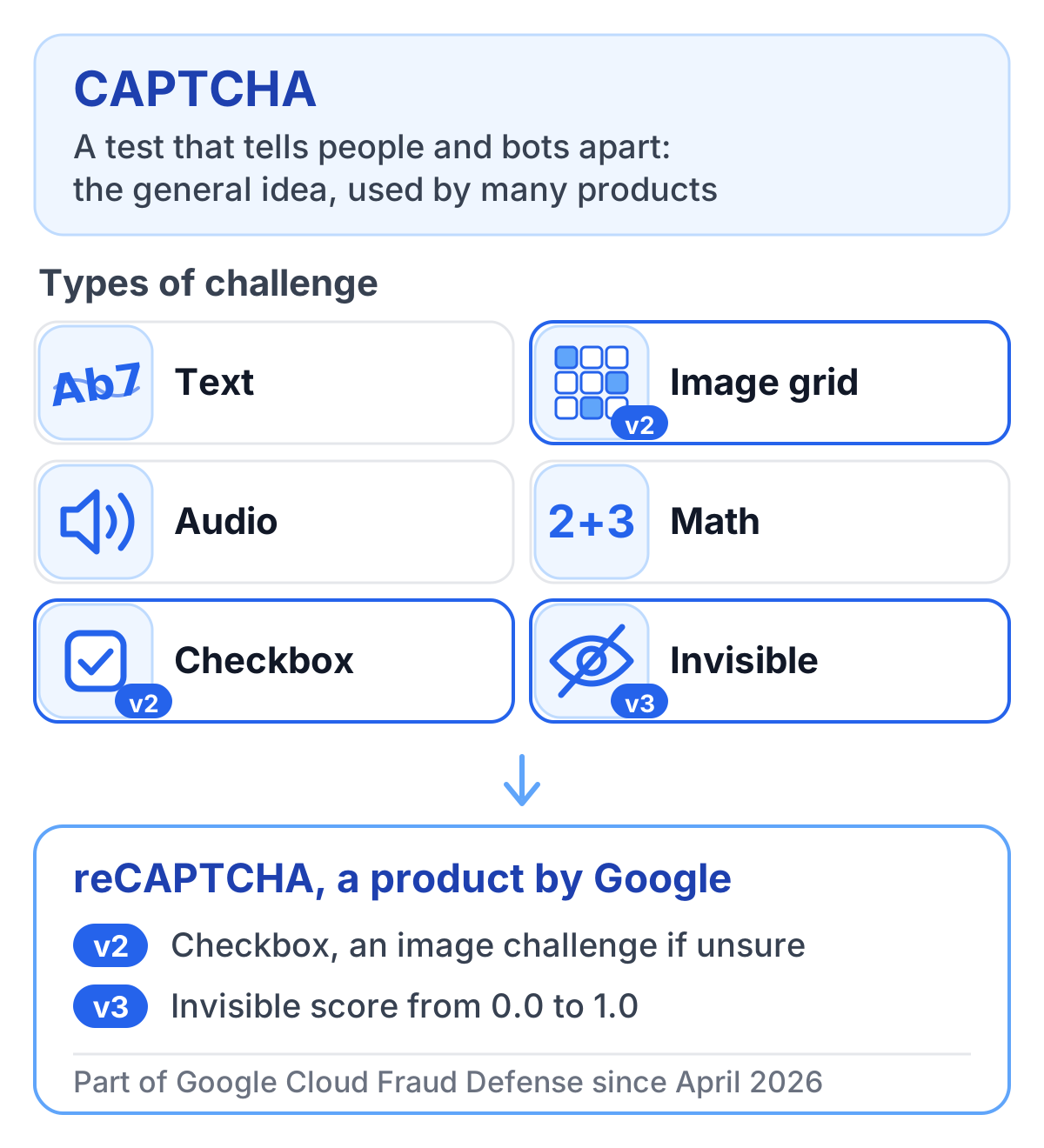
The word CAPTCHA covers every type of challenge: distorted text, image grids, audio, simple sums, checkboxes and invisible checks that run in the background. If you want the basics first, What is a CAPTCHA? explains how the challenge and the response work.
What reCAPTCHA is today
Google bought reCAPTCHA in 2009. The first version showed distorted words. Version 2, launched in 2014, brought the “I’m not a robot” checkbox and the image grids with traffic lights and crosswalks. Version 3, from 2018, dropped the visible task altogether and returns a score for every request. The differences between the two current versions are in reCAPTCHA v2 vs v3.
The last two years changed how reCAPTCHA is run more than how it looks:
- Classic keys were moved into Google Cloud projects between late 2025 and early 2026. Usage and billing now sit in Google Cloud.
- The free allowance is 10,000 assessments a month, counted per organization across all sites. Above that, the Premium tier charges an $8 flat fee up to 100,000 assessments and $1 per 1,000 beyond. The full breakdown is in reCAPTCHA pricing.
- Since 2 April 2026, Google processes reCAPTCHA data as a processor under its Cloud Data Processing Addendum, and the website operator is the sole controller.
- On 22 April 2026, reCAPTCHA became part of a product suite called Google Cloud Fraud Defense.
TrustCaptcha vs reCAPTCHA
Both stop automated form abuse. They differ in how they treat visitors, what happens to the data, and how much of the setup you control.
Security
Bot detection and prevention
reCAPTCHA detects. Version 3 scores every request from signals Google does not publish, and version 2 decides on its own whether a visitor gets an image challenge. Since October 2025 Google also offers policy-based challenge keys, which show a challenge when the score falls below a threshold you set, and in July 2026 it added a QR code challenge that it describes as AI-resistant. What the score does not do is slow an attack down: a bot that earns a good score pays nothing for it.
TrustCaptcha detects and slows attacks down. Every request gets a proof-of-work puzzle that the browser solves in the background, and many crawlers, scripts and simple bots cannot complete it at all. For the rest, the bot score sets how hard the puzzle gets. A normal visitor spends a moment of computing time, a suspicious request a lot more, and you can raise the difficulty up to five times for patterns you distrust. A built-in honeypot with several hidden trap fields catches form spam on top. The score combines static and dynamic signals, so an attacker who switches IP addresses, rotates device data or clears cookies does not start from a clean slate.
Scores, thresholds and rules
The two scores run in opposite directions. reCAPTCHA v3 returns a value from 0.0 to 1.0, where 1.0 is very likely a good interaction and 0.0 very likely a bot, and Google’s v3 documentation suggests a default threshold of 0.5. The free Essentials tier returns only four score levels (0.1, 0.3, 0.7 and 0.9); Premium and Enterprise return eleven. You can tag requests with action names such as login or signup. Premium adds a policy engine limited to three rules, and Enterprise has the full policy engine. Everything beyond the threshold is up to your own code.
TrustCaptcha’s bot score works the other way round: lower means more trustworthy. Every result explains why a request got its score and recommends an action, so your server can let the request through, ask for step-up authentication, flag the session or block it. Security rules come on top of the score. You can keep IP allow and block lists, use geoblocking in allowlist or blocklist mode, and write rules that combine IP address, country, language, time zone, browser, operating system and device type, with match any, match all or match none. Rules can carry a name and an expiry date, which helps with temporary campaigns, and bypass keys let automated tests pass with a bot score of 0.
Server-side token validation
With both products, the browser only produces a token. Your server makes the decision. For reCAPTCHA, your backend sends the token to Google’s CreateAssessment API or to the older siteverify endpoint, and each token can be assessed once.
One reCAPTCHA detail is worth testing in your own setup. If your organization goes over the free 10,000 assessments a month without billing, Google says siteverify fails open: it returns success with a score of 0.9 and only adds an error message, while CreateAssessment returns an HTTP 429 error. A backend that only reads the success flag and the score lets every request through once the limit is reached, bots included.
TrustCaptcha tokens are single-use and time-bound. Your backend confirms each one through the TrustCaptcha API with your secret API key, so a visitor cannot fake a successful check or switch the CAPTCHA off in the browser. You can adjust token lifetime and validation behavior, and separate environments with their own keys keep staging and production apart.
In short: reCAPTCHA gives you a score and leaves the response to your code. TrustCaptcha also makes every request cost the attacker something, and it gives you rules and an explained score to act on.
Privacy and GDPR
What data is processed
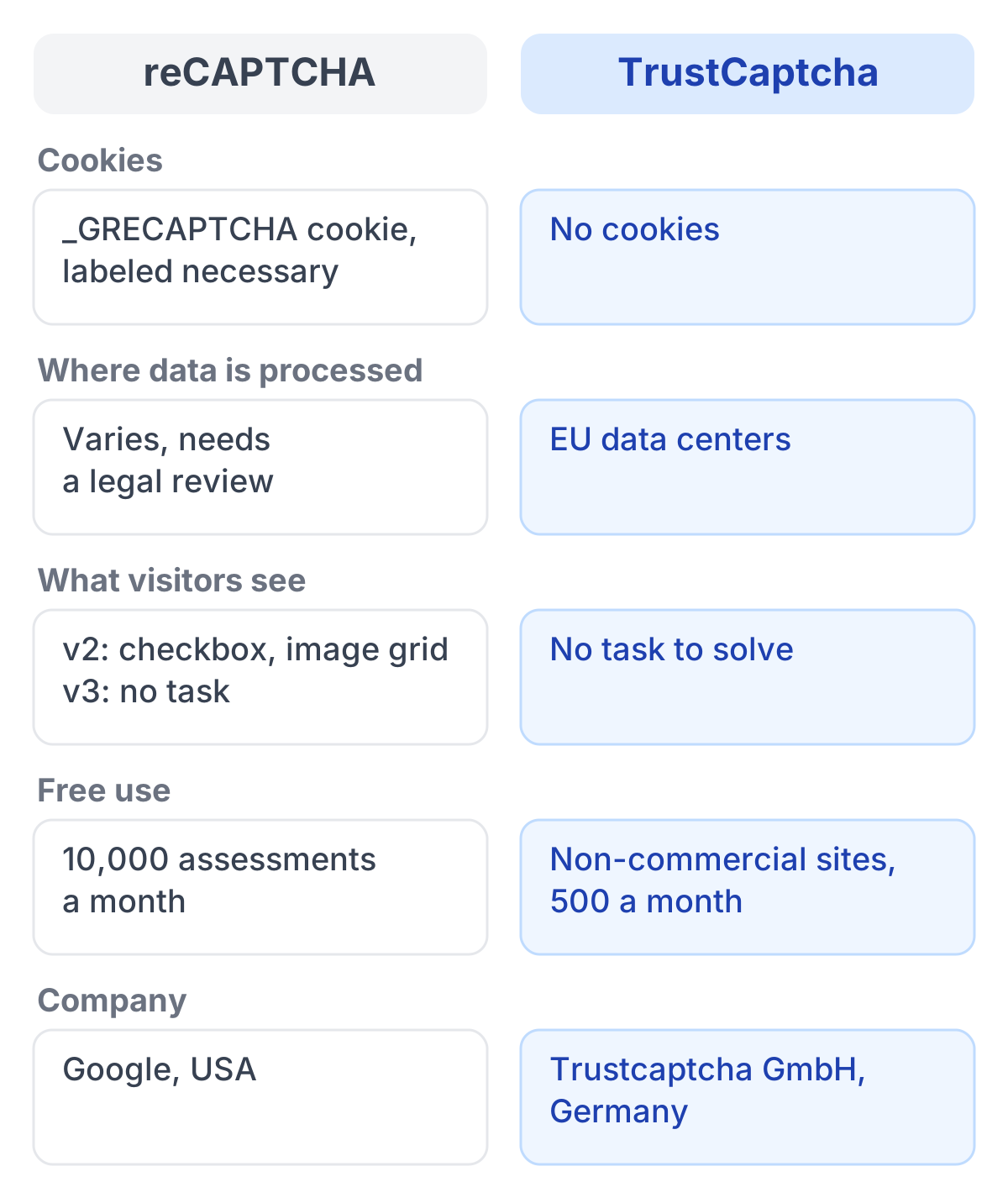
Google does not publish the list of signals reCAPTCHA collects. Since 2 April 2026 it processes reCAPTCHA data as a processor under its Cloud Data Processing Addendum, and its service terms say the data is used only to provide and maintain the service, not for personalized advertising. reCAPTCHA sets the _GRECAPTCHA cookie, which Google calls necessary, and because the data goes to Google, international transfers need a legal review.
TrustCaptcha lists the categories it may process: connection and request data such as IP address, timestamp and headers; device and browser characteristics; interaction signals such as click patterns and mouse movements; and repetition indicators that reveal attack patterns, for example many started checks in a short time. It sets no cookies and processes the data in EU data centers.
Privacy by design and data minimization
TrustCaptcha uses the data for one purpose, bot protection, and not for advertising audiences or unrelated analytics. It only needs to run where protection matters (login, signup, password reset, contact forms and checkout) instead of on every page. Verification data is kept for 48 hours by default, configurable up to seven days, and is then deleted or anonymized.
Google’s purpose limitation is a real step forward compared with the years when reCAPTCHA ran under Google’s own privacy policy. What Google’s reCAPTCHA pages still do not describe is the other half of minimization: which signals are collected.
Transparency
Toward your visitors, your privacy policy has to name the CAPTCHA you use. Under Art. 13 GDPR that means who processes the data, for what purpose, on which legal basis, whether data goes to countries outside the EU and how long it is stored. With reCAPTCHA the data goes to Google, so the transfer question is the hard one. This section is not legal advice; clear the wording with your data protection officer.
Toward you as the operator, both products show results. Google gives you assessments and usage in your Google Cloud project. TrustCaptcha shows every verification in a results table with timestamp, origin, IP address, device, duration, bot score and status, explains why a request passed or failed, and keeps an audit log of changes to keys, rules and contracts. The Data Processing Agreement can be signed online.
The open questions around Google are covered in Is reCAPTCHA GDPR compliant?, and what belongs in your privacy policy for TrustCaptcha is in our TrustCaptcha GDPR guide.
In short: Google’s processor role covers its side of the contract, but the cookie and the transfer question stay on your desk. TrustCaptcha documents what it processes, keeps it in the EU and sets no cookies.
User experience and accessibility
Ease of use
reCAPTCHA v3 shows visitors nothing. v2 shows the checkbox and, when Google is unsure, an image grid, with an audio challenge as the fallback for people who cannot see the pictures. Image grids are slow on phones, and ambiguous pictures often take more than one attempt. Every extra step on a signup or checkout form is a chance for the visitor to leave.
TrustCaptcha has no task in any configuration. The widget starts on its own when the visitor begins to fill in the form, has no time limit and is usually done before the visitor reaches the submit button. It adapts to phones, tablets and narrow inline layouts.
Accessibility
Since 28 June 2025 the European Accessibility Act applies to many consumer services in the EU, and CAPTCHAs are among the most common barriers in online forms. Image and audio challenges depend on sight or hearing, and puzzles in modal overlays can break keyboard focus and confuse screen readers. reCAPTCHA v3 avoids the task, but v2’s image grid needs a working alternative for everyone who cannot use it.
TrustCaptcha has no puzzle, no audio task and no timer. The widget ships with ARIA labels and screen-reader texts that you can override or translate, and it keeps focus order and tab navigation intact. TrustCaptcha is designed to meet WCAG 2.2 and the European Accessibility Act, so people who use a screen reader or only a keyboard get through the form like everyone else.
In short: with reCAPTCHA v3 visitors see nothing, with v2 some of them get a puzzle. With TrustCaptcha nobody gets one.
Integration and customization
reCAPTCHA’s strongest practical argument is reach: most form plugins and content management systems support it out of the box, and Google offers mobile SDKs for iOS and Android.
TrustCaptcha has server libraries for PHP, Python, Go, Rust, Ruby and .NET, guides for frontend frameworks such as React, Vue, Angular and Svelte, and plugins for WordPress, Craft CMS, TYPO3, Shopware 6, Magento 2, JTL-Shop, Keycloak and Webflow. The WordPress plugin covers logins, comments, WooCommerce checkout and form plugins such as Contact Form 7, Elementor Forms, Gravity Forms, Ninja Forms and WPForms.
The widget can be styled in detail: text, background and border colors, border width and corner radius, light or dark mode or the visitor’s system setting, 37+ languages with automatic detection, and your own texts and translations. A widget without TrustCaptcha branding and a fully invisible widget are part of the Captcha Branding add-on.
Dependence on Google Cloud
reCAPTCHA now runs entirely inside Google Cloud. Google stopped issuing classic keys in 2024 and moved the existing ones into Google Cloud projects between late 2025 and early 2026; keys without a project lost API access. Usage, settings and billing are managed in that project, and anything above the free 10,000 assessments a month needs a Google Cloud billing account. Support is a separate Google Cloud plan, from a minimum of $29 a month for Standard Support to $15,000 for Premium Support. Since 22 April 2026 the product belongs to Google Cloud Fraud Defense, and its Enterprise tier is a subscription with a minimum term of 12 months.
For teams that already run on Google Cloud, that is convenient: one console, one bill, one contract. For everyone else it means setting up a Google Cloud organization, its billing and its terms for what is, in the end, a form protection.
TrustCaptcha is a standalone service with its own dashboard, monthly plans and a Data Processing Agreement you sign online. Best-effort e-mail support is included from the Team plan up, and support add-ons add guaranteed response times.
When reCAPTCHA is the right choice
reCAPTCHA is a reasonable choice if your site already runs on Google Cloud, stays within the free 10,000 assessments, and your data protection officer is comfortable with the cookie and the data transfers to Google.
If one of those does not hold, our comparison of reCAPTCHA alternatives goes through seven options, from Cloudflare Turnstile to open-source CAPTCHAs you host yourself.
TrustCaptcha: a CAPTCHA without a task
TrustCaptcha checks visitors in the background with proof-of-work and bot scoring, so visitors have nothing to solve or click. It sets no cookies, processes data in EU data centers and includes a Data Processing Agreement for every customer.
Try TrustCaptcha
Every plan starts with a 14-day free trial, and non-commercial websites can use TrustCaptcha for free. Start your free trial and see how your forms behave without a puzzle in front of them.