
'%3e%3crect%20width='32'%20height='24'%20fill='white'/%3e%3cpath%20fill-rule='evenodd'%20clip-rule='evenodd'%20d='M0%200V24H32V0H0Z'%20fill='%232E42A5'/%3e%3cmask%20id='mask0_270_67386'%20style='mask-type:luminance'%20maskUnits='userSpaceOnUse'%20x='0'%20y='0'%20width='32'%20height='24'%3e%3cpath%20fill-rule='evenodd'%20clip-rule='evenodd'%20d='M0%200V24H32V0H0Z'%20fill='white'/%3e%3c/mask%3e%3cg%20mask='url(%23mask0_270_67386)'%3e%3cpath%20d='M-3.56323%2022.2854L3.47846%2025.2635L32.1597%203.23787L35.874%20-1.18761L28.344%20-2.18297L16.6456%207.3085L7.22956%2013.7035L-3.56323%2022.2854Z'%20fill='white'/%3e%3cpath%20d='M-2.59924%2024.3719L0.988173%2026.1001L34.5402%20-1.59881H29.5031L-2.59924%2024.3719Z'%20fill='%23F50100'/%3e%3cpath%20d='M35.5631%2022.2854L28.5214%2025.2635L-0.159817%203.23787L-3.87415%20-1.18761L3.65593%20-2.18297L15.3543%207.3085L24.7703%2013.7035L35.5631%2022.2854Z'%20fill='white'/%3e%3cpath%20d='M35.3229%2023.7829L31.7355%2025.5111L17.4487%2013.6518L13.2129%2012.3267L-4.23151%20-1.17246H0.805637L18.2403%2012.0063L22.8713%2013.5952L35.3229%2023.7829Z'%20fill='%23F50100'/%3e%3cmask%20id='path-7-inside-1_270_67386'%20fill='white'%3e%3cpath%20fill-rule='evenodd'%20clip-rule='evenodd'%20d='M19.7777%20-2H12.2222V8H-1.97253V16H12.2222V26H19.7777V16H34.0275V8H19.7777V-2Z'/%3e%3c/mask%3e%3cpath%20fill-rule='evenodd'%20clip-rule='evenodd'%20d='M19.7777%20-2H12.2222V8H-1.97253V16H12.2222V26H19.7777V16H34.0275V8H19.7777V-2Z'%20fill='%23F50100'/%3e%3cpath%20d='M12.2222%20-2V-4H10.2222V-2H12.2222ZM19.7777%20-2H21.7777V-4H19.7777V-2ZM12.2222%208V10H14.2222V8H12.2222ZM-1.97253%208V6H-3.97253V8H-1.97253ZM-1.97253%2016H-3.97253V18H-1.97253V16ZM12.2222%2016H14.2222V14H12.2222V16ZM12.2222%2026H10.2222V28H12.2222V26ZM19.7777%2026V28H21.7777V26H19.7777ZM19.7777%2016V14H17.7777V16H19.7777ZM34.0275%2016V18H36.0275V16H34.0275ZM34.0275%208H36.0275V6H34.0275V8ZM19.7777%208H17.7777V10H19.7777V8ZM12.2222%200H19.7777V-4H12.2222V0ZM14.2222%208V-2H10.2222V8H14.2222ZM-1.97253%2010H12.2222V6H-1.97253V10ZM0.0274658%2016V8H-3.97253V16H0.0274658ZM12.2222%2014H-1.97253V18H12.2222V14ZM14.2222%2026V16H10.2222V26H14.2222ZM19.7777%2024H12.2222V28H19.7777V24ZM17.7777%2016V26H21.7777V16H17.7777ZM34.0275%2014H19.7777V18H34.0275V14ZM32.0275%208V16H36.0275V8H32.0275ZM19.7777%2010H34.0275V6H19.7777V10ZM17.7777%20-2V8H21.7777V-2H17.7777Z'%20fill='white'%20mask='url(%23path-7-inside-1_270_67386)'/%3e%3c/g%3e%3c/g%3e%3cdefs%3e%3cclipPath%20id='clip0_270_67386'%3e%3crect%20width='32'%20height='24'%20fill='white'/%3e%3c/clipPath%3e%3c/defs%3e%3c/svg%3e)
'%3e%3crect%20width='32'%20height='24'%20fill='white'/%3e%3cpath%20fill-rule='evenodd'%20clip-rule='evenodd'%20d='M0%2016H32V24H0V16Z'%20fill='%23FFD018'/%3e%3cpath%20fill-rule='evenodd'%20clip-rule='evenodd'%20d='M0%208H32V16H0V8Z'%20fill='%23E31D1C'/%3e%3cpath%20fill-rule='evenodd'%20clip-rule='evenodd'%20d='M0%200H32V8H0V0Z'%20fill='%23272727'/%3e%3c/g%3e%3cdefs%3e%3cclipPath%20id='clip0_270_67353'%3e%3crect%20width='32'%20height='24'%20fill='white'/%3e%3c/clipPath%3e%3c/defs%3e%3c/svg%3e)
'%3e%3crect%20width='32'%20height='24'%20fill='white'/%3e%3cpath%20fill-rule='evenodd'%20clip-rule='evenodd'%20d='M22%200H32V24H22V0Z'%20fill='%23F50100'/%3e%3cpath%20fill-rule='evenodd'%20clip-rule='evenodd'%20d='M0%200H12V24H0V0Z'%20fill='%232E42A5'/%3e%3cpath%20fill-rule='evenodd'%20clip-rule='evenodd'%20d='M10%200H22V24H10V0Z'%20fill='%23F7FCFF'/%3e%3c/g%3e%3cdefs%3e%3cclipPath%20id='clip0_270_67361'%3e%3crect%20width='32'%20height='24'%20fill='white'/%3e%3c/clipPath%3e%3c/defs%3e%3c/svg%3e)

TrustCaptcha and DORA compliance
TrustCaptcha helps organizations reduce automated abuse on critical web workflows (logins, password resets, signups, checkout and high-value forms) without adding user friction. It is an invisible CAPTCHA: no puzzles and no interaction required, because the widget starts on its own.
This page describes how TrustCaptcha fits into DORA compliance work on operational resilience. DORA is about improving ICT risk management, strengthening resilience, and making third-party dependencies more transparent and controllable. Your DORA obligations depend on your entity type and scope, but TrustCaptcha can be documented as a practical control for preventing and responding to automated attacks that threaten availability, integrity and customer experience.
What TrustCaptcha does
TrustCaptcha distinguishes humans from bots in two ways. On every plan, the visitor’s browser solves a proof-of-work task that gets harder with the risk of the request. From the Solo plan, TrustCaptcha also generates a bot score for each interaction, from 0 (very likely human) to 1 (very likely bot). It uses technical and behavioral signals to identify patterns typical of automated traffic, including:
- Credential stuffing and brute-force login attempts
- Form spam and automated submissions
- Scraping and inventory abuse
- Account creation attacks and promotion abuse
Because TrustCaptcha is invisible, it avoids user disruption while still producing an enforceable decision (allow, review, rate-limit, or block) that helps protect service reliability.
Why an invisible CAPTCHA matters for operational resilience
In operational resilience programs, user friction can become an operational risk: support tickets spike, conversions drop, and legitimate customers are blocked during traffic peaks. TrustCaptcha is designed to reduce those failure modes:
- No challenges during normal conditions: users proceed without interruptions
- Adaptive enforcement: you decide when to step up friction (or avoid it entirely)
- Lower abandonment: especially on mobile and accessibility-sensitive flows
- Reduced attack amplification: fewer “challenge loops” that attackers can exploit
For your resilience documentation, that means a security control that does not slow the service down or lock customers out.
Mapping TrustCaptcha to DORA-aligned control areas
1) ICT risk management and protective controls
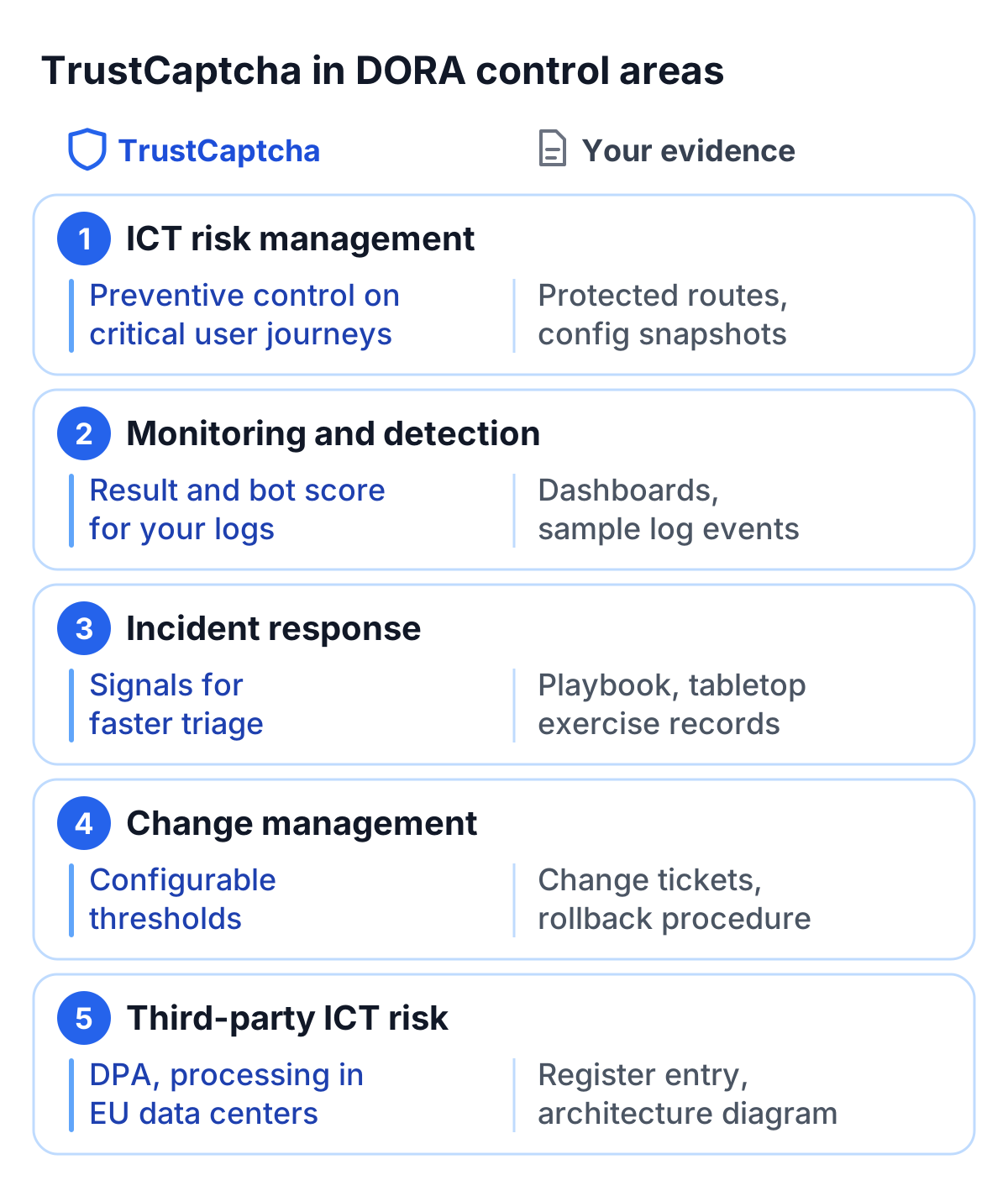
TrustCaptcha is a preventive control that reduces the likelihood of automated abuse succeeding on internet-facing workflows. Typical actions include:
- Bot protection is enabled on defined “critical user journeys” (login, reset, signup, checkout)
- Enforcement thresholds are configured, reviewed, and changed via controlled processes
- Abuse patterns are monitored and used to update configuration
Suggested evidence
- Protected route list and configuration snapshots
- Change management records for threshold updates
- Periodic review
2) Monitoring, logging, and detection
DORA-aligned operations depend on visibility. TrustCaptcha produces outcomes you can incorporate into monitoring:
- Verification result (passed or not) and the recommended action
- Bot score (0 to 1) or a risk band you derive from it
- Protected endpoint and timestamp
- Correlation identifiers (request ID / session correlation you assign)
- Rate-limit or enforcement action taken by your application
3) Incident response and escalation
Automated abuse is often a precursor to security incidents (account takeover, fraud, service disruption). TrustCaptcha supports incident readiness by enabling faster triage:
- Detect: anomaly alerts (sudden score shifts, volume spikes)
- Respond: tighten thresholds, block IP ranges, rate-limit, enable additional checks
- Recover: revert to normal thresholds after stabilization
- Learn: post-incident analysis based on logs and outcomes
Suggested evidence
- Incident playbook section referencing bot/abuse scenarios
- Records of tabletop exercises including credential stuffing or spam floods
- Post-incident report template including TrustCaptcha telemetry
4) Change management and controlled configuration
A resilience program benefits from predictable change practices:
- Config changes are tracked (who/when/why)
- Rollback steps documented
- High-risk changes require approval (e.g., blocking aggressiveness changes)
Suggested evidence
- Change tickets for configuration adjustments
- Rollback procedure
- Versioned configuration exports (where applicable)
5) Third-party ICT risk and documentation
If TrustCaptcha is treated as a third-party ICT service, you typically document:
- Service purpose and scope in your architecture inventory
- Data categories processed
- Security measures and access controls
- Retention approach
- Contractual artifacts (including the DPA, which every TrustCaptcha customer gets)
Suggested evidence
- Third-party register entry
- Architecture diagram showing where TrustCaptcha sits
- Contractual documents from TrustCaptcha (DPA and terms)
Data processing posture
TrustCaptcha sets no cookies of its own and builds no cross-site tracking profiles. Processing is focused on one security decision: whether an interaction is likely human or automated abuse. The data is processed in EU data centers.
Depending on configuration, TrustCaptcha may process different data types as outlined in the DPA. The goal is purpose limitation (bot protection only) and data minimization (only what’s needed for the decision).
Security measures
TrustCaptcha’s security controls are built around the kind of processing that abuse prevention involves. Common security measures to document include:
- Encryption in transit for data transmissions
- Access controls restricting who can view operational data
- Operational monitoring to detect misuse and anomalous patterns
- Separation of environments and disciplined change management
Implementation guidance for resilient deployments
These practices help the control behave predictably under load and during incidents:
Protect vulnerable fields
Enable TrustCaptcha on workflows that are most attacked and most business-critical:
- Login, password reset, signup
- Contact/lead forms
- Checkout, promo redemption, inventory endpoints
- API routes exposed to abuse
Use tiered enforcement
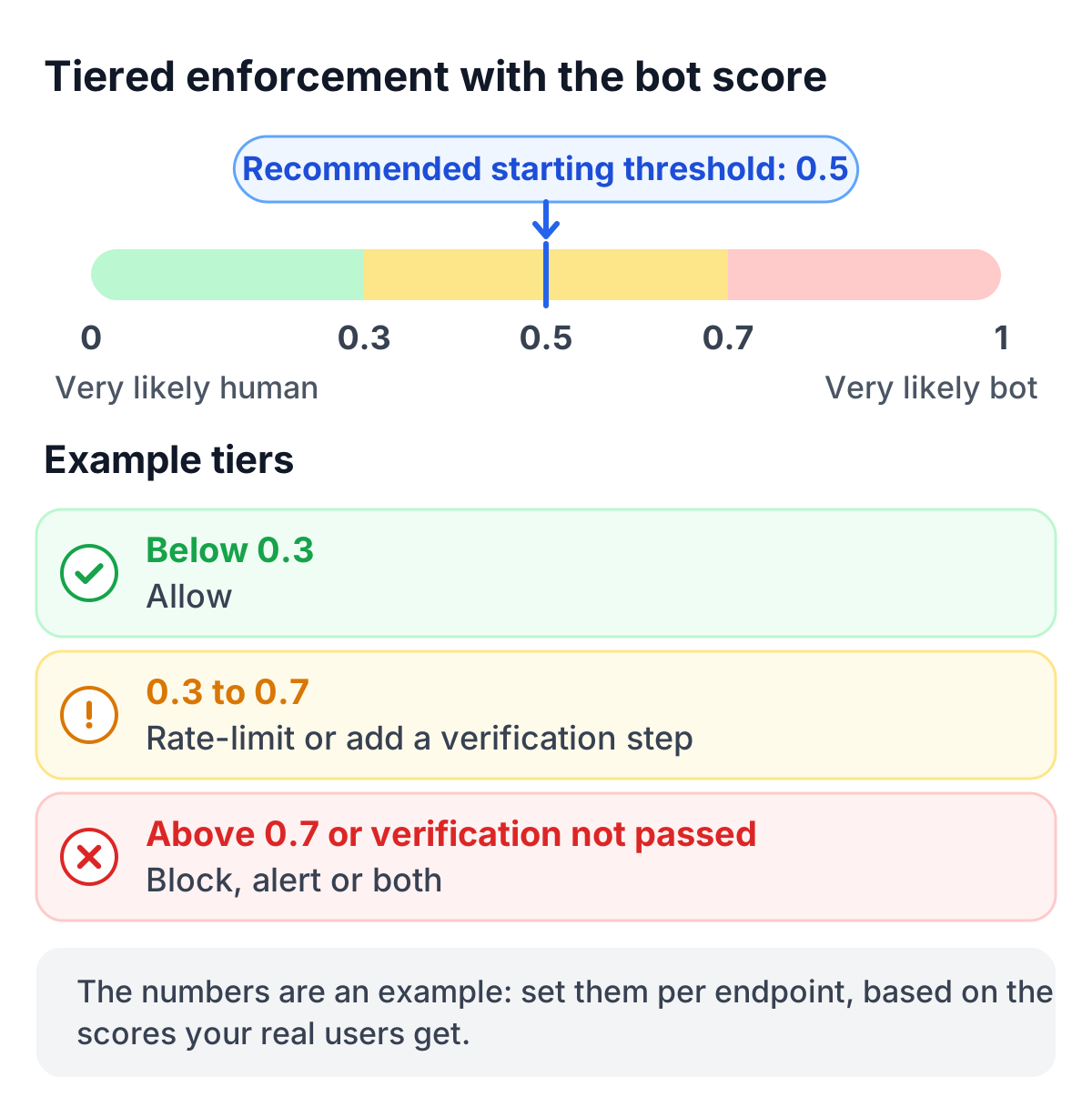
Use the bot score to enforce proportionate steps. It runs from 0 (very likely human) to 1 (very likely bot), so a higher score means more risk, and 0.5 is the recommended starting threshold. For example:
- Low risk (bot score below 0.3): allow
- Medium risk (0.3 to 0.7): rate-limit or require an additional verification step (optional)
- High risk (above 0.7, or verification not passed): block and/or alert
The numbers are an example. Set them per endpoint, based on the scores your real users get.
Make it observable
Ensure TrustCaptcha outcomes are captured in your logs with a correlation ID so operations can answer:
- Which endpoints were attacked?
- When did the attack start and stop?
- What enforcement was applied?
- Did user impact occur?
DORA checklist
- Inventory entry: TrustCaptcha purpose, scope, owners, critical routes
- Architecture snippet: where the decision is made and enforced
- Monitoring: dashboards and alert thresholds for bot spikes
- Logging: sample events with correlation IDs
- Incident playbook: steps to tighten/relax enforcement during attacks
- Change control: approvals and rollback plan for threshold updates
- Retention: window + automated cleanup description
- Vendor docs: contracts, including the DPA
Next steps
For DORA work, TrustCaptcha covers the bot side: it prevents automated abuse, gives your monitoring and incident response usable signals, and comes with the third-party documentation (DPA, EU processing) your register needs.
Every plan comes with a 14-day free trial: try TrustCaptcha for free.