

'%3e%3crect%20width='32'%20height='24'%20fill='white'/%3e%3cpath%20fill-rule='evenodd'%20clip-rule='evenodd'%20d='M0%200V24H32V0H0Z'%20fill='%232E42A5'/%3e%3cmask%20id='mask0_270_67386'%20style='mask-type:luminance'%20maskUnits='userSpaceOnUse'%20x='0'%20y='0'%20width='32'%20height='24'%3e%3cpath%20fill-rule='evenodd'%20clip-rule='evenodd'%20d='M0%200V24H32V0H0Z'%20fill='white'/%3e%3c/mask%3e%3cg%20mask='url(%23mask0_270_67386)'%3e%3cpath%20d='M-3.56323%2022.2854L3.47846%2025.2635L32.1597%203.23787L35.874%20-1.18761L28.344%20-2.18297L16.6456%207.3085L7.22956%2013.7035L-3.56323%2022.2854Z'%20fill='white'/%3e%3cpath%20d='M-2.59924%2024.3719L0.988173%2026.1001L34.5402%20-1.59881H29.5031L-2.59924%2024.3719Z'%20fill='%23F50100'/%3e%3cpath%20d='M35.5631%2022.2854L28.5214%2025.2635L-0.159817%203.23787L-3.87415%20-1.18761L3.65593%20-2.18297L15.3543%207.3085L24.7703%2013.7035L35.5631%2022.2854Z'%20fill='white'/%3e%3cpath%20d='M35.3229%2023.7829L31.7355%2025.5111L17.4487%2013.6518L13.2129%2012.3267L-4.23151%20-1.17246H0.805637L18.2403%2012.0063L22.8713%2013.5952L35.3229%2023.7829Z'%20fill='%23F50100'/%3e%3cmask%20id='path-7-inside-1_270_67386'%20fill='white'%3e%3cpath%20fill-rule='evenodd'%20clip-rule='evenodd'%20d='M19.7777%20-2H12.2222V8H-1.97253V16H12.2222V26H19.7777V16H34.0275V8H19.7777V-2Z'/%3e%3c/mask%3e%3cpath%20fill-rule='evenodd'%20clip-rule='evenodd'%20d='M19.7777%20-2H12.2222V8H-1.97253V16H12.2222V26H19.7777V16H34.0275V8H19.7777V-2Z'%20fill='%23F50100'/%3e%3cpath%20d='M12.2222%20-2V-4H10.2222V-2H12.2222ZM19.7777%20-2H21.7777V-4H19.7777V-2ZM12.2222%208V10H14.2222V8H12.2222ZM-1.97253%208V6H-3.97253V8H-1.97253ZM-1.97253%2016H-3.97253V18H-1.97253V16ZM12.2222%2016H14.2222V14H12.2222V16ZM12.2222%2026H10.2222V28H12.2222V26ZM19.7777%2026V28H21.7777V26H19.7777ZM19.7777%2016V14H17.7777V16H19.7777ZM34.0275%2016V18H36.0275V16H34.0275ZM34.0275%208H36.0275V6H34.0275V8ZM19.7777%208H17.7777V10H19.7777V8ZM12.2222%200H19.7777V-4H12.2222V0ZM14.2222%208V-2H10.2222V8H14.2222ZM-1.97253%2010H12.2222V6H-1.97253V10ZM0.0274658%2016V8H-3.97253V16H0.0274658ZM12.2222%2014H-1.97253V18H12.2222V14ZM14.2222%2026V16H10.2222V26H14.2222ZM19.7777%2024H12.2222V28H19.7777V24ZM17.7777%2016V26H21.7777V16H17.7777ZM34.0275%2014H19.7777V18H34.0275V14ZM32.0275%208V16H36.0275V8H32.0275ZM19.7777%2010H34.0275V6H19.7777V10ZM17.7777%20-2V8H21.7777V-2H17.7777Z'%20fill='white'%20mask='url(%23path-7-inside-1_270_67386)'/%3e%3c/g%3e%3c/g%3e%3cdefs%3e%3cclipPath%20id='clip0_270_67386'%3e%3crect%20width='32'%20height='24'%20fill='white'/%3e%3c/clipPath%3e%3c/defs%3e%3c/svg%3e)
'%3e%3crect%20width='32'%20height='24'%20fill='white'/%3e%3cpath%20fill-rule='evenodd'%20clip-rule='evenodd'%20d='M0%2016H32V24H0V16Z'%20fill='%23FFD018'/%3e%3cpath%20fill-rule='evenodd'%20clip-rule='evenodd'%20d='M0%208H32V16H0V8Z'%20fill='%23E31D1C'/%3e%3cpath%20fill-rule='evenodd'%20clip-rule='evenodd'%20d='M0%200H32V8H0V0Z'%20fill='%23272727'/%3e%3c/g%3e%3cdefs%3e%3cclipPath%20id='clip0_270_67353'%3e%3crect%20width='32'%20height='24'%20fill='white'/%3e%3c/clipPath%3e%3c/defs%3e%3c/svg%3e)
'%3e%3crect%20width='32'%20height='24'%20fill='white'/%3e%3cpath%20fill-rule='evenodd'%20clip-rule='evenodd'%20d='M22%200H32V24H22V0Z'%20fill='%23F50100'/%3e%3cpath%20fill-rule='evenodd'%20clip-rule='evenodd'%20d='M0%200H12V24H0V0Z'%20fill='%232E42A5'/%3e%3cpath%20fill-rule='evenodd'%20clip-rule='evenodd'%20d='M10%200H22V24H10V0Z'%20fill='%23F7FCFF'/%3e%3c/g%3e%3cdefs%3e%3cclipPath%20id='clip0_270_67361'%3e%3crect%20width='32'%20height='24'%20fill='white'/%3e%3c/clipPath%3e%3c/defs%3e%3c/svg%3e)
'/%3e%3c/svg%3e)
JTL Shop CAPTCHA Plugin
Protect key JTL Shop forms like contact, newsletter signup, account creation, and checkout from bots and spam with our native TrustCaptcha plugin. EU-hosted, privacy-first, no cookies, no puzzles.
Quickstart
How the integration works
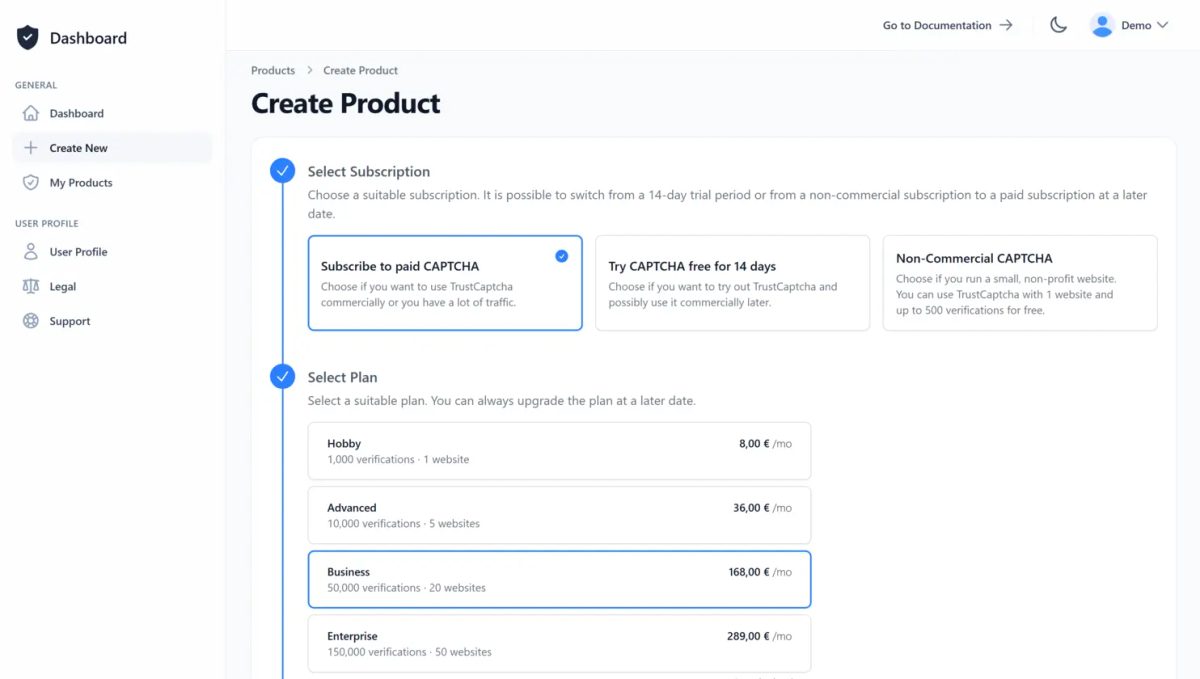
1. Create a CAPTCHA
Create a user account or log in with an existing one. Then create a new CAPTCHA or select an existing one. If you’re unsure whether TrustCaptcha is right for you, try our CAPTCHA service risk-free for 14 days at no cost.
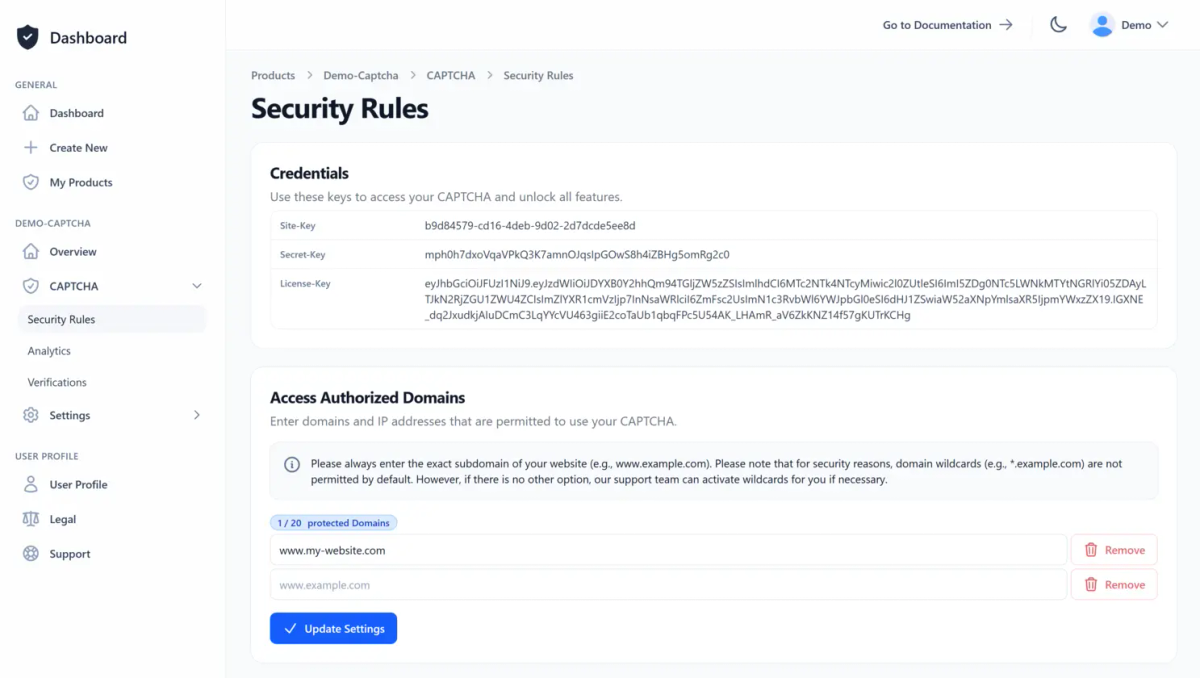
On the CAPTCHA overview page, you will find all the important information, such as the site key and licence key, and you can also create your API key. Allow your websites to access your CAPTCHA by simply adding them to the access authorised domain list in the CAPTCHA security rules.
2. Integrate the CAPTCHA Plugin
Install the JTL Shop TrustCaptcha plugin by uploading out JTL CAPTCHA plugin as a ZIP file in your JTL Shop admin area (Plug-ins → Plug-in manager → Upload). After the upload, refresh the page and install the plugin from Plug-ins → Plug-in manager → Available. For precise, step-by-step instructions, please read the CAPTCHA integration guide for JTL Shop in our documentation.
Read the documentation
TrustCaptcha works as a native JTL Shop spam protection provider. JTL decides when TrustCaptcha is required and therefore displayed. Currently, the plugin supports these areas:
- Availability requests
- Contact us
- Create customer account
- Forgot password
- Newsletter
- Order completion
- Order without registration
- Question about item
Different platform instead of JTL Shop?
If you do not want to use JTL Shop or have several websites or applications, you can select a different framework or platform here. If there is no pre-built integration from us for your preferred frontend technology, your software developers can integrate the CAPTCHA themselves – using our documentation – or ask our support-team for a pre-built integration solution.


'%20%3e%3cg%20style=''%20%3e%3cg%20transform='matrix(1%200%200%201%20-9.1%200)'%20id='XMLID_563_'%20%3e%3cpath%20style='stroke:%20none;%20stroke-width:%201;%20stroke-dasharray:%20none;%20stroke-linecap:%20butt;%20stroke-dashoffset:%200;%20stroke-linejoin:%20miter;%20stroke-miterlimit:%204;%20fill:%20rgb(24,158,255);%20fill-rule:%20nonzero;%20opacity:%201;'%20transform='%20translate(-46,%20-55)'%20d='M%2087.8%2098%20c%20-4.8%20-3.6%20-11.8%20-6.3%20-19.3%20-9.2%20c%20-8.9%20-3.4%20-19%20-7.3%20-26.5%20-13.4%20C%2033.4%2068.6%2029.2%2060%2029.2%2049.1%20c%200%20-9.8%204%20-18.1%2011.7%20-24.1%20c%208.6%20-6.8%2021.6%20-10.3%2037.6%20-10.3%20c%204.4%200%208.7%200.3%2012.6%200.8%20c%200.3%200%200.7%20-0.1%200.8%20-0.5%20c%200.2%20-0.3%200.1%20-0.7%20-0.2%20-0.9%20C%2081.7%205%2068.6%200%2055%200%20C%2040.3%200%2026.5%205.7%2016.1%2016.1%20C%205.7%2026.5%200%2040.3%200%2055%20c%200%2014.7%205.7%2028.5%2016.1%2038.9%20C%2026.5%20104.3%2040.3%20110%2055%20110%20c%2011.9%200%2023.2%20-3.7%2032.7%20-10.8%20c%200.2%20-0.2%200.3%20-0.4%200.3%20-0.6%20C%2088.1%2098.4%2088%2098.2%2087.8%2098%20z'%20stroke-linecap='round'%20/%3e%3c/g%3e%3cg%20transform='matrix(1%200%200%201%2029.85%200.85)'%20id='XMLID_562_'%20%3e%3cpath%20style='stroke:%20none;%20stroke-width:%201;%20stroke-dasharray:%20none;%20stroke-linecap:%20butt;%20stroke-dashoffset:%200;%20stroke-linejoin:%20miter;%20stroke-miterlimit:%204;%20fill:%20rgb(24,158,255);%20fill-rule:%20nonzero;%20opacity:%201;'%20transform='%20translate(-84.95,%20-55.85)'%20d='M%20109.8%2049.9%20c%200%20-0.2%20-0.1%20-0.4%20-0.3%20-0.5%20C%2098.1%2039.9%2088.8%2036%2077.5%2036%20c%20-6%200%20-10.6%201.2%20-13.7%203.6%20c%20-2.7%202.1%20-4.1%204.9%20-4.1%208.3%20c%200%209.4%2011.6%2013.8%2024.9%2018.8%20c%206.9%202.6%2014%205.2%2020.6%208.9%20c%200.1%200.1%200.2%200.1%200.4%200.1%20c%200.1%200%200.2%200%200.3%20-0.1%20c%200.2%20-0.1%200.4%20-0.2%200.5%20-0.5%20c%202.5%20-6.4%203.8%20-13.2%203.8%20-20.1%20C%20110.1%2053.4%20110%2051.7%20109.8%2049.9%20z'%20stroke-linecap='round'%20/%3e%3c/g%3e%3c/g%3e%3c/g%3e%3c/svg%3e)


3. Configure the TrustCaptcha Plugin
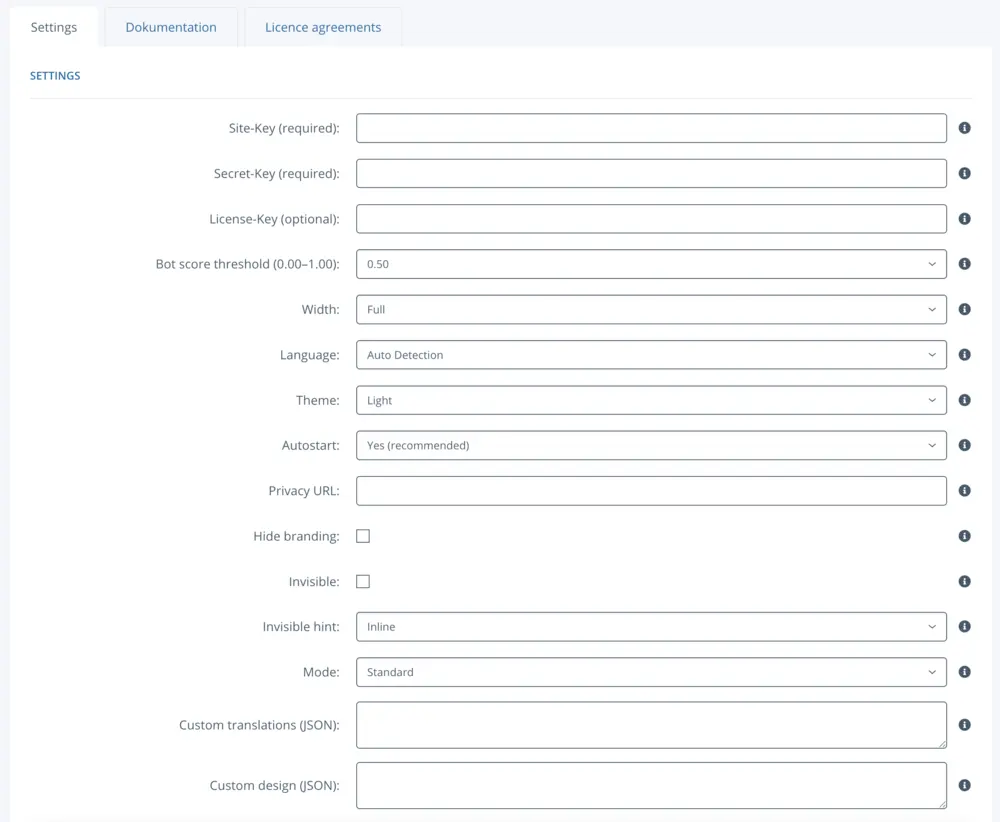
Log in as an admin and go to Plug-ins → Installed plug-ins → TrustCaptcha. Enter your site-key, API key (formerly secret-key) and – if needed – the license-key. Then adjust settings like language, theme, and the bot-score threshold.
Finally, enable TrustCaptcha where you need it: in the admin area, search for “spam protection” and set “Enable spam protection” to “Yes” for the areas you want to protect. You can find more details in our JTL Shop documentation.
4. Congratulations 🎉
You are now protected by TrustCaptcha - congratulations!

FAQs
Which JTL Shop versions are supported?
What does the JTL Shop plugin do?
Which JTL Shop areas can I protect?
Does it replace JTL’s CAPTCHA or add another widget?
How do I set it up?
What is bot score and what threshold should I start with?
Can I customize design and language?
Do I need cookie consent for TrustCaptcha?
TrustCaptcha blocks spam and bots, not customers. No puzzles, GDPR-ready, EU-hosted.


Protect your JTL Shop application with TrustCaptcha in just a few steps!
- EU-hosted & GDPR-ready
- No puzzles
- Try free for 14 days