

'%3e%3crect%20width='32'%20height='24'%20fill='white'/%3e%3cpath%20fill-rule='evenodd'%20clip-rule='evenodd'%20d='M0%200V24H32V0H0Z'%20fill='%232E42A5'/%3e%3cmask%20id='mask0_270_67386'%20style='mask-type:luminance'%20maskUnits='userSpaceOnUse'%20x='0'%20y='0'%20width='32'%20height='24'%3e%3cpath%20fill-rule='evenodd'%20clip-rule='evenodd'%20d='M0%200V24H32V0H0Z'%20fill='white'/%3e%3c/mask%3e%3cg%20mask='url(%23mask0_270_67386)'%3e%3cpath%20d='M-3.56323%2022.2854L3.47846%2025.2635L32.1597%203.23787L35.874%20-1.18761L28.344%20-2.18297L16.6456%207.3085L7.22956%2013.7035L-3.56323%2022.2854Z'%20fill='white'/%3e%3cpath%20d='M-2.59924%2024.3719L0.988173%2026.1001L34.5402%20-1.59881H29.5031L-2.59924%2024.3719Z'%20fill='%23F50100'/%3e%3cpath%20d='M35.5631%2022.2854L28.5214%2025.2635L-0.159817%203.23787L-3.87415%20-1.18761L3.65593%20-2.18297L15.3543%207.3085L24.7703%2013.7035L35.5631%2022.2854Z'%20fill='white'/%3e%3cpath%20d='M35.3229%2023.7829L31.7355%2025.5111L17.4487%2013.6518L13.2129%2012.3267L-4.23151%20-1.17246H0.805637L18.2403%2012.0063L22.8713%2013.5952L35.3229%2023.7829Z'%20fill='%23F50100'/%3e%3cmask%20id='path-7-inside-1_270_67386'%20fill='white'%3e%3cpath%20fill-rule='evenodd'%20clip-rule='evenodd'%20d='M19.7777%20-2H12.2222V8H-1.97253V16H12.2222V26H19.7777V16H34.0275V8H19.7777V-2Z'/%3e%3c/mask%3e%3cpath%20fill-rule='evenodd'%20clip-rule='evenodd'%20d='M19.7777%20-2H12.2222V8H-1.97253V16H12.2222V26H19.7777V16H34.0275V8H19.7777V-2Z'%20fill='%23F50100'/%3e%3cpath%20d='M12.2222%20-2V-4H10.2222V-2H12.2222ZM19.7777%20-2H21.7777V-4H19.7777V-2ZM12.2222%208V10H14.2222V8H12.2222ZM-1.97253%208V6H-3.97253V8H-1.97253ZM-1.97253%2016H-3.97253V18H-1.97253V16ZM12.2222%2016H14.2222V14H12.2222V16ZM12.2222%2026H10.2222V28H12.2222V26ZM19.7777%2026V28H21.7777V26H19.7777ZM19.7777%2016V14H17.7777V16H19.7777ZM34.0275%2016V18H36.0275V16H34.0275ZM34.0275%208H36.0275V6H34.0275V8ZM19.7777%208H17.7777V10H19.7777V8ZM12.2222%200H19.7777V-4H12.2222V0ZM14.2222%208V-2H10.2222V8H14.2222ZM-1.97253%2010H12.2222V6H-1.97253V10ZM0.0274658%2016V8H-3.97253V16H0.0274658ZM12.2222%2014H-1.97253V18H12.2222V14ZM14.2222%2026V16H10.2222V26H14.2222ZM19.7777%2024H12.2222V28H19.7777V24ZM17.7777%2016V26H21.7777V16H17.7777ZM34.0275%2014H19.7777V18H34.0275V14ZM32.0275%208V16H36.0275V8H32.0275ZM19.7777%2010H34.0275V6H19.7777V10ZM17.7777%20-2V8H21.7777V-2H17.7777Z'%20fill='white'%20mask='url(%23path-7-inside-1_270_67386)'/%3e%3c/g%3e%3c/g%3e%3cdefs%3e%3cclipPath%20id='clip0_270_67386'%3e%3crect%20width='32'%20height='24'%20fill='white'/%3e%3c/clipPath%3e%3c/defs%3e%3c/svg%3e)
'%3e%3crect%20width='32'%20height='24'%20fill='white'/%3e%3cpath%20fill-rule='evenodd'%20clip-rule='evenodd'%20d='M0%2016H32V24H0V16Z'%20fill='%23FFD018'/%3e%3cpath%20fill-rule='evenodd'%20clip-rule='evenodd'%20d='M0%208H32V16H0V8Z'%20fill='%23E31D1C'/%3e%3cpath%20fill-rule='evenodd'%20clip-rule='evenodd'%20d='M0%200H32V8H0V0Z'%20fill='%23272727'/%3e%3c/g%3e%3cdefs%3e%3cclipPath%20id='clip0_270_67353'%3e%3crect%20width='32'%20height='24'%20fill='white'/%3e%3c/clipPath%3e%3c/defs%3e%3c/svg%3e)
'%3e%3crect%20width='32'%20height='24'%20fill='white'/%3e%3cpath%20fill-rule='evenodd'%20clip-rule='evenodd'%20d='M22%200H32V24H22V0Z'%20fill='%23F50100'/%3e%3cpath%20fill-rule='evenodd'%20clip-rule='evenodd'%20d='M0%200H12V24H0V0Z'%20fill='%232E42A5'/%3e%3cpath%20fill-rule='evenodd'%20clip-rule='evenodd'%20d='M10%200H22V24H10V0Z'%20fill='%23F7FCFF'/%3e%3c/g%3e%3cdefs%3e%3cclipPath%20id='clip0_270_67361'%3e%3crect%20width='32'%20height='24'%20fill='white'/%3e%3c/clipPath%3e%3c/defs%3e%3c/svg%3e)
'%20%3e%3cg%20style=''%20%3e%3cg%20transform='matrix(1%200%200%201%20-9.1%200)'%20id='XMLID_563_'%20%3e%3cpath%20style='stroke:%20none;%20stroke-width:%201;%20stroke-dasharray:%20none;%20stroke-linecap:%20butt;%20stroke-dashoffset:%200;%20stroke-linejoin:%20miter;%20stroke-miterlimit:%204;%20fill:%20rgb(24,158,255);%20fill-rule:%20nonzero;%20opacity:%201;'%20transform='%20translate(-46,%20-55)'%20d='M%2087.8%2098%20c%20-4.8%20-3.6%20-11.8%20-6.3%20-19.3%20-9.2%20c%20-8.9%20-3.4%20-19%20-7.3%20-26.5%20-13.4%20C%2033.4%2068.6%2029.2%2060%2029.2%2049.1%20c%200%20-9.8%204%20-18.1%2011.7%20-24.1%20c%208.6%20-6.8%2021.6%20-10.3%2037.6%20-10.3%20c%204.4%200%208.7%200.3%2012.6%200.8%20c%200.3%200%200.7%20-0.1%200.8%20-0.5%20c%200.2%20-0.3%200.1%20-0.7%20-0.2%20-0.9%20C%2081.7%205%2068.6%200%2055%200%20C%2040.3%200%2026.5%205.7%2016.1%2016.1%20C%205.7%2026.5%200%2040.3%200%2055%20c%200%2014.7%205.7%2028.5%2016.1%2038.9%20C%2026.5%20104.3%2040.3%20110%2055%20110%20c%2011.9%200%2023.2%20-3.7%2032.7%20-10.8%20c%200.2%20-0.2%200.3%20-0.4%200.3%20-0.6%20C%2088.1%2098.4%2088%2098.2%2087.8%2098%20z'%20stroke-linecap='round'%20/%3e%3c/g%3e%3cg%20transform='matrix(1%200%200%201%2029.85%200.85)'%20id='XMLID_562_'%20%3e%3cpath%20style='stroke:%20none;%20stroke-width:%201;%20stroke-dasharray:%20none;%20stroke-linecap:%20butt;%20stroke-dashoffset:%200;%20stroke-linejoin:%20miter;%20stroke-miterlimit:%204;%20fill:%20rgb(24,158,255);%20fill-rule:%20nonzero;%20opacity:%201;'%20transform='%20translate(-84.95,%20-55.85)'%20d='M%20109.8%2049.9%20c%200%20-0.2%20-0.1%20-0.4%20-0.3%20-0.5%20C%2098.1%2039.9%2088.8%2036%2077.5%2036%20c%20-6%200%20-10.6%201.2%20-13.7%203.6%20c%20-2.7%202.1%20-4.1%204.9%20-4.1%208.3%20c%200%209.4%2011.6%2013.8%2024.9%2018.8%20c%206.9%202.6%2014%205.2%2020.6%208.9%20c%200.1%200.1%200.2%200.1%200.4%200.1%20c%200.1%200%200.2%200%200.3%20-0.1%20c%200.2%20-0.1%200.4%20-0.2%200.5%20-0.5%20c%202.5%20-6.4%203.8%20-13.2%203.8%20-20.1%20C%20110.1%2053.4%20110%2051.7%20109.8%2049.9%20z'%20stroke-linecap='round'%20/%3e%3c/g%3e%3c/g%3e%3c/g%3e%3c/svg%3e)
Shopware 6 CAPTCHA Plugin
Replace Shopware 6's built-in CAPTCHAs with TrustCaptcha and protect customer registration, the contact form, checkout, newsletter sign-up, and product reviews against bots and spam — without image puzzles. EU-hosted, privacy-first, and GDPR-ready.
Quickstart
How the integration works
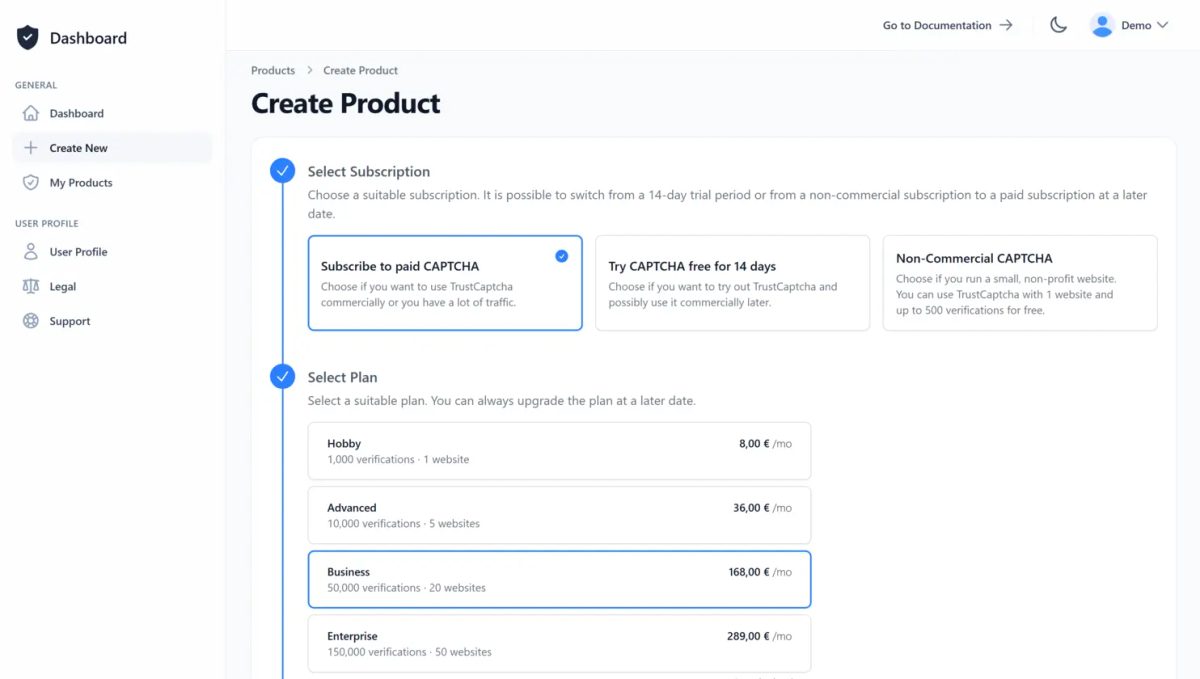
1. Create a CAPTCHA
Create a user account or log in with an existing one. Then create a new CAPTCHA or select an existing one. If you’re unsure whether TrustCaptcha is right for you, try our CAPTCHA service risk-free for 14 days at no cost.
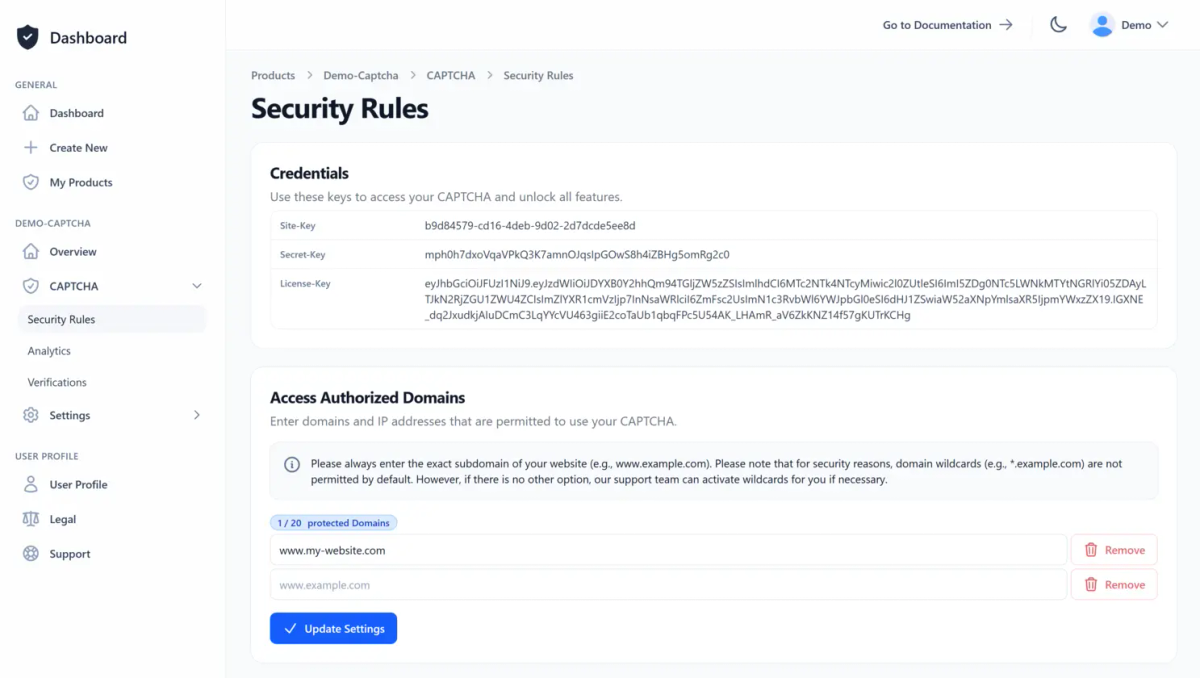
On the CAPTCHA overview page, you will find all the important information, such as the site key and licence key, and you can also create your API key. Allow your websites to access your CAPTCHA by simply adding them to the access authorised domain list in the CAPTCHA security rules.
2. Integrate the CAPTCHA Plugin
Download our Shopware 6 CAPTCHA plugin and upload it in your Shopware 6 administration. After the upload, install and activate the extension from the extension list. For precise, step-by-step instructions, please read the CAPTCHA integration guide for Shopware 6 in our documentation.
Read the documentation
TrustCaptcha integrates as a native Shopware 6 CAPTCHA. Once activated, Shopware automatically displays it on the standard storefront forms, including:
- Customer registration
- Contact form
- Checkout (guest order / registration during checkout)
- Newsletter sign-up
- Product reviews
Different platform instead of Shopware 6?
If you do not want to use Shopware 6 or have several websites or applications, you can select a different framework or platform here. If there is no pre-built integration from us for your preferred frontend technology, your software developers can integrate the CAPTCHA themselves – using our documentation – or ask our support-team for a pre-built integration solution.


'/%3e%3c/svg%3e)


3. Configure the TrustCaptcha Plugin
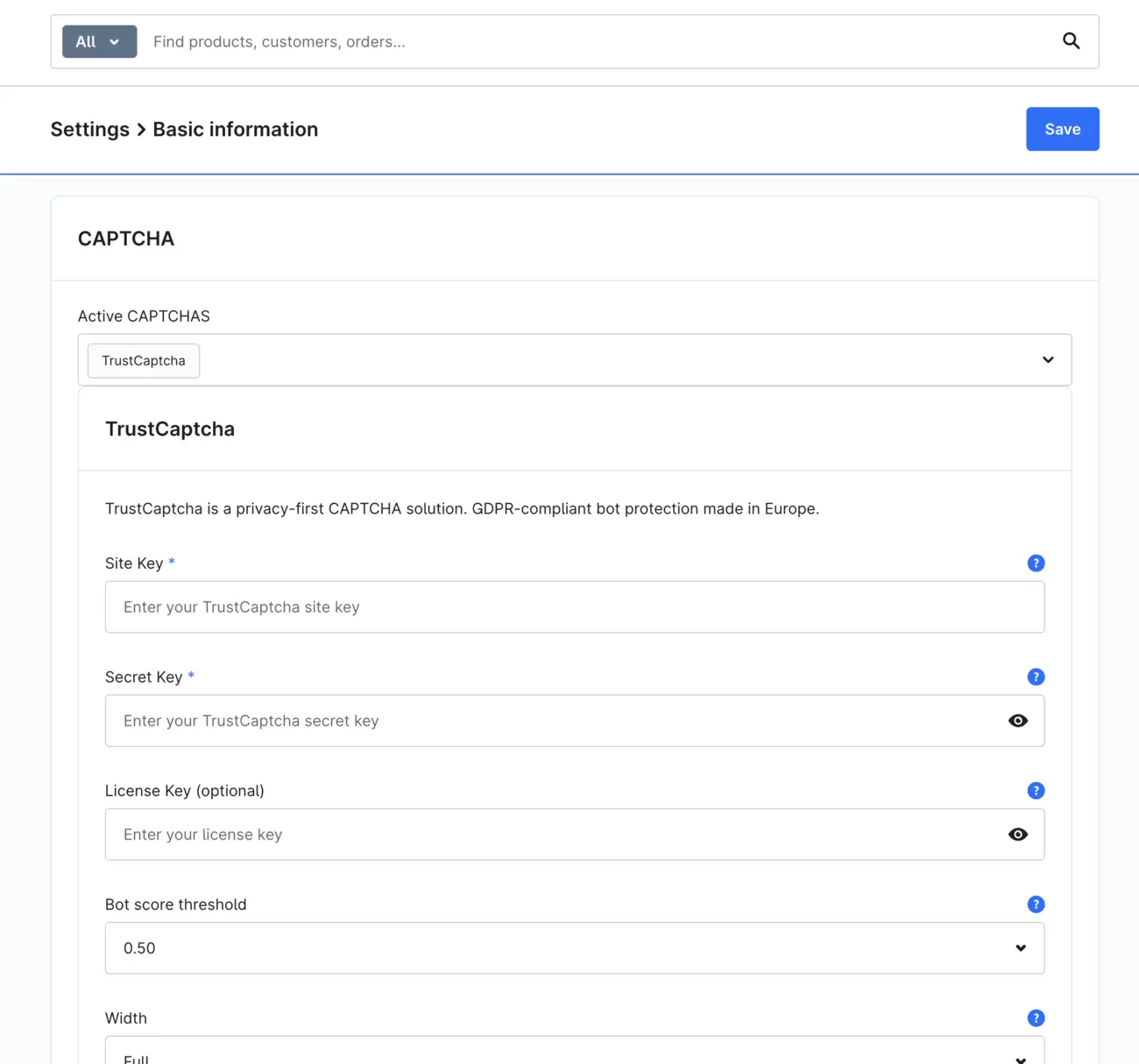
Log in as an admin to your Shopware 6 administration and open the basic shop settings. In the CAPTCHA section, select TrustCaptcha as the active CAPTCHA, enter your site-key and API key (formerly secret-key) and save. If you like, you can also adjust the language, theme and sensitivity to match your shop. You can find more details in our Shopware 6 documentation.
4. Congratulations 🎉
You are now protected by TrustCaptcha - congratulations!

FAQs
Which Shopware versions does the plugin support?
Which Shopware storefront forms does TrustCaptcha protect?
Does TrustCaptcha replace Shopware's built-in CAPTCHAs?
Is the plugin suitable for shops in the EU?
Is the Shopware 6 plugin available in the Shopware Store?
TrustCaptcha blocks spam and bots, not customers. No puzzles, GDPR-ready, EU-hosted.


Protect your Shopware 6 application with TrustCaptcha in just a few steps!
- EU-hosted & GDPR-ready
- No puzzles
- Try free for 14 days