

'%3e%3crect%20width='32'%20height='24'%20fill='white'/%3e%3cpath%20fill-rule='evenodd'%20clip-rule='evenodd'%20d='M0%200V24H32V0H0Z'%20fill='%232E42A5'/%3e%3cmask%20id='mask0_270_67386'%20style='mask-type:luminance'%20maskUnits='userSpaceOnUse'%20x='0'%20y='0'%20width='32'%20height='24'%3e%3cpath%20fill-rule='evenodd'%20clip-rule='evenodd'%20d='M0%200V24H32V0H0Z'%20fill='white'/%3e%3c/mask%3e%3cg%20mask='url(%23mask0_270_67386)'%3e%3cpath%20d='M-3.56323%2022.2854L3.47846%2025.2635L32.1597%203.23787L35.874%20-1.18761L28.344%20-2.18297L16.6456%207.3085L7.22956%2013.7035L-3.56323%2022.2854Z'%20fill='white'/%3e%3cpath%20d='M-2.59924%2024.3719L0.988173%2026.1001L34.5402%20-1.59881H29.5031L-2.59924%2024.3719Z'%20fill='%23F50100'/%3e%3cpath%20d='M35.5631%2022.2854L28.5214%2025.2635L-0.159817%203.23787L-3.87415%20-1.18761L3.65593%20-2.18297L15.3543%207.3085L24.7703%2013.7035L35.5631%2022.2854Z'%20fill='white'/%3e%3cpath%20d='M35.3229%2023.7829L31.7355%2025.5111L17.4487%2013.6518L13.2129%2012.3267L-4.23151%20-1.17246H0.805637L18.2403%2012.0063L22.8713%2013.5952L35.3229%2023.7829Z'%20fill='%23F50100'/%3e%3cmask%20id='path-7-inside-1_270_67386'%20fill='white'%3e%3cpath%20fill-rule='evenodd'%20clip-rule='evenodd'%20d='M19.7777%20-2H12.2222V8H-1.97253V16H12.2222V26H19.7777V16H34.0275V8H19.7777V-2Z'/%3e%3c/mask%3e%3cpath%20fill-rule='evenodd'%20clip-rule='evenodd'%20d='M19.7777%20-2H12.2222V8H-1.97253V16H12.2222V26H19.7777V16H34.0275V8H19.7777V-2Z'%20fill='%23F50100'/%3e%3cpath%20d='M12.2222%20-2V-4H10.2222V-2H12.2222ZM19.7777%20-2H21.7777V-4H19.7777V-2ZM12.2222%208V10H14.2222V8H12.2222ZM-1.97253%208V6H-3.97253V8H-1.97253ZM-1.97253%2016H-3.97253V18H-1.97253V16ZM12.2222%2016H14.2222V14H12.2222V16ZM12.2222%2026H10.2222V28H12.2222V26ZM19.7777%2026V28H21.7777V26H19.7777ZM19.7777%2016V14H17.7777V16H19.7777ZM34.0275%2016V18H36.0275V16H34.0275ZM34.0275%208H36.0275V6H34.0275V8ZM19.7777%208H17.7777V10H19.7777V8ZM12.2222%200H19.7777V-4H12.2222V0ZM14.2222%208V-2H10.2222V8H14.2222ZM-1.97253%2010H12.2222V6H-1.97253V10ZM0.0274658%2016V8H-3.97253V16H0.0274658ZM12.2222%2014H-1.97253V18H12.2222V14ZM14.2222%2026V16H10.2222V26H14.2222ZM19.7777%2024H12.2222V28H19.7777V24ZM17.7777%2016V26H21.7777V16H17.7777ZM34.0275%2014H19.7777V18H34.0275V14ZM32.0275%208V16H36.0275V8H32.0275ZM19.7777%2010H34.0275V6H19.7777V10ZM17.7777%20-2V8H21.7777V-2H17.7777Z'%20fill='white'%20mask='url(%23path-7-inside-1_270_67386)'/%3e%3c/g%3e%3c/g%3e%3cdefs%3e%3cclipPath%20id='clip0_270_67386'%3e%3crect%20width='32'%20height='24'%20fill='white'/%3e%3c/clipPath%3e%3c/defs%3e%3c/svg%3e)
'%3e%3crect%20width='32'%20height='24'%20fill='white'/%3e%3cpath%20fill-rule='evenodd'%20clip-rule='evenodd'%20d='M0%2016H32V24H0V16Z'%20fill='%23FFD018'/%3e%3cpath%20fill-rule='evenodd'%20clip-rule='evenodd'%20d='M0%208H32V16H0V8Z'%20fill='%23E31D1C'/%3e%3cpath%20fill-rule='evenodd'%20clip-rule='evenodd'%20d='M0%200H32V8H0V0Z'%20fill='%23272727'/%3e%3c/g%3e%3cdefs%3e%3cclipPath%20id='clip0_270_67353'%3e%3crect%20width='32'%20height='24'%20fill='white'/%3e%3c/clipPath%3e%3c/defs%3e%3c/svg%3e)
'%3e%3crect%20width='32'%20height='24'%20fill='white'/%3e%3cpath%20fill-rule='evenodd'%20clip-rule='evenodd'%20d='M22%200H32V24H22V0Z'%20fill='%23F50100'/%3e%3cpath%20fill-rule='evenodd'%20clip-rule='evenodd'%20d='M0%200H12V24H0V0Z'%20fill='%232E42A5'/%3e%3cpath%20fill-rule='evenodd'%20clip-rule='evenodd'%20d='M10%200H22V24H10V0Z'%20fill='%23F7FCFF'/%3e%3c/g%3e%3cdefs%3e%3cclipPath%20id='clip0_270_67361'%3e%3crect%20width='32'%20height='24'%20fill='white'/%3e%3c/clipPath%3e%3c/defs%3e%3c/svg%3e)
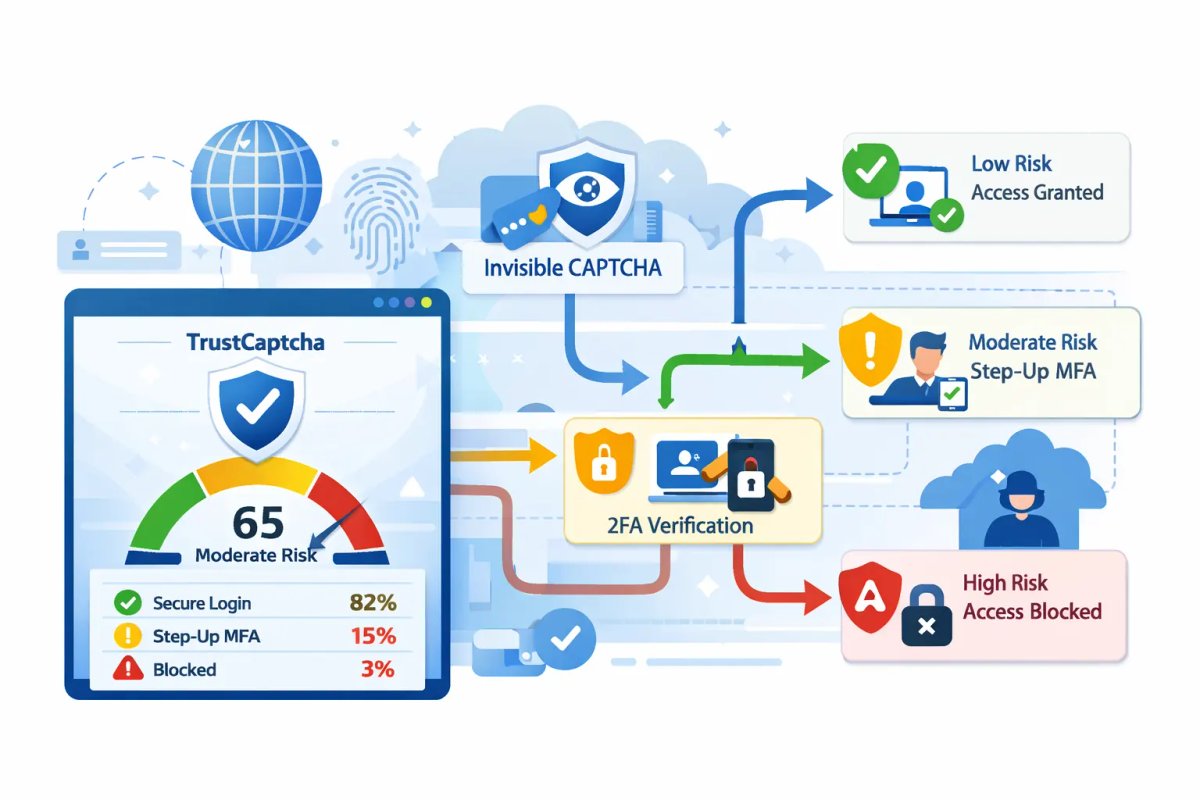
Risk-Based Multi-Factor Authentication (MFA) with TrustCaptcha
Multi-Factor Authentication (MFA) is one of the most effective controls for preventing account takeover—especially against credential stuffing and password reuse. The challenge is that universal MFA can be disruptive: it adds extra steps, increases drop-off, and creates support load (lost devices, locked accounts, OTP delivery issues).
TrustCaptcha helps you implement MFA in a way that is both robust and practical. It operates as an invisible, no-interaction CAPTCHA (no puzzles, no user tasks) and generates a TrustScore for each session or action. This enables risk-based MFA (step-up authentication): most legitimate users proceed without interruption, while edge and high-risk cases are selectively routed into MFA.
What MFA is—and why businesses rely on it
MFA requires users to prove identity using at least two independent factors:
- Something you know: password, PIN
- Something you have: authenticator app, hardware key, device-bound passkey
- Something you are: biometrics (often as part of device-bound authentication)
MFA reduces the probability that a stolen password alone can grant access. In practice, it’s most valuable where attackers scale automated abuse:
- Login endpoints
- Password reset flows
- Registration/sign-up (to prevent fake accounts)
- Sensitive actions (payments, admin changes, exports)
The usability problem: why “MFA everywhere” can be disruptive
Blanket MFA can create measurable friction:
- Conversion loss: users abandon flows when prompted unexpectedly.
- Support burden: lockouts, device changes, lost second factors.
- Accessibility concerns: some challenge types are difficult for users with disabilities.
- Operational complexity: exception handling becomes the norm instead of the edge case.
Many organisations therefore adopt step-up MFA: apply MFA when risk is higher, not indiscriminately.
Risk-based MFA: the step-up model
Risk-based MFA evaluates context and routes users into one of three outcomes:
- Allow: low-risk, proceed with standard authentication
- Step-up: moderate-to-high risk, require MFA
- Deny / block: very high-risk, block the attempt or require stronger remediation
The core value is that MFA friction becomes targeted. This improves security posture without degrading legitimate user experience.
Where TrustCaptcha fits: invisible assessment + selective step-up
TrustCaptcha supports risk-based MFA in two key ways:
1) Invisible verification (no puzzles, no interaction)
TrustCaptcha runs silently in the background to detect automation and suspicious behavior patterns. Legitimate users should not see anything in the normal case.
2) TrustScore-driven routing (edge and risky sessions only)
Each request receives a TrustScore (a risk signal). You can configure thresholds so that:
- High TrustScore → allow (no MFA prompt)
- Medium/edge TrustScore → step-up MFA
- Low TrustScore → block or stronger verification
This model prevents MFA from becoming a constant interruption while still forcing stronger assurance precisely when the probability of abuse is elevated.
Recommended reference architecture
A simple, reliable pattern looks like this:
- Client interaction begins (login attempt or sensitive action)
- TrustCaptcha executes invisibly and returns a token
- Your backend verifies the token with TrustCaptcha and receives a TrustScore
- Your policy engine decides: allow / step-up MFA / block
- If step-up is required, your MFA provider completes the challenge (TOTP, push, WebAuthn, etc.)
- Decision, score, and outcomes are logged for monitoring and audit trails
This keeps TrustCaptcha as a risk signal and abuse filter, while your MFA stack remains your authoritative identity proof mechanism.
Policy design: turning TrustScore into consistent decisions
A policy should be deterministic, explainable, and testable. Most businesses implement tiered thresholds and then refine them with business context.
A baseline TrustScore policy (example)
{
  "rules": [
{"if": "trustScore >= 80", "action": "allow"},
{"if": "trustScore >= 50 && trustScore < 80", "action": "step_up_mfa"},
{"if": "trustScore < 50", "action": "block_or_strong_step_up"}
  ]
}
Add business context for high-risk actions
You can tighten policies for actions with higher impact:
- Changing password, email, phone
- Payment or payout changes
- Admin role changes
- Exporting data
- API key creation
- Bulk actions
Example: “Always step-up MFA for payout changes, regardless of score” (or require a higher TrustScore to skip MFA).
Common risk signals to combine with TrustScore
Combine TrustScore with your own telemetry to reduce blind spots:
- New device / new browser profile
- Impossible travel / geo-velocity anomalies
- Repeated failed logins
- Credential stuffing patterns
- IP reputation / ASN anomalies
- High request velocity
- Known breached credential indicators (if you use them)
The goal is not to invent complexity—it’s to ensure that step-up triggers are meaningful and hard to game.
Integration best practices (business-ready checklist)
1) Protect the right surfaces first
Start with endpoints where abuse is most likely and most damaging:
- Login
- Password reset
- Registration
- High-impact account changes
2) Keep the flow server-authoritative
Never “trust” the client alone. Your backend should:
- Verify TrustCaptcha tokens
- Evaluate TrustScore and policy
- Decide whether to step-up MFA or deny
This prevents client manipulation and ensures consistent enforcement across platforms.
3) Design a clean step-up UX
When step-up is required:
- Explain why in plain language (“We need to confirm it’s really you.”)
- Offer strong factors first (WebAuthn/passkeys, authenticator app)
- Provide accessible alternatives where needed
- Avoid puzzle-style challenges for MFA; keep it identity-focused
4) Implement rate limits and lockout protections
Attackers may try to trigger MFA prompts to cause frustration or denial of service. Use:
- Per-IP and per-account rate limits
- Progressive backoff after repeated failures
- Safe lockout handling and recovery paths
5) Log decisions for monitoring and incident response
Log structured events:
- TrustScore (or bucketed score range)
- Policy decision (allow/step-up/block)
- MFA outcome (success/failure)
- Action type (login, reset, payout change)
- Correlation IDs for investigations
These logs support tuning, troubleshooting, and audit trails.
6) Tune thresholds with real-world feedback
Treat policy like a control system:
- Start conservative (more step-up than you ultimately want)
- Monitor false positives and friction metrics
- Adjust thresholds per endpoint and action type
- Run phased rollout (pilot → broader rollout)
MFA method guidance (choosing factors that fit your risk)
Not all MFA is equal. A pragmatic hierarchy many businesses follow:
- Preferred (phishing-resistant): WebAuthn / passkeys / FIDO2 security keys
- Strong: Authenticator app (TOTP), push with number matching (where supported)
- Fallback (use with care): SMS OTP (better than nothing, but higher risk than phishing-resistant methods)
TrustCaptcha’s role is to ensure you don’t force these steps on everyone—only when the situation is uncertain or risky.
Accessibility and compliance considerations
Risk-based flows should remain usable for everyone:
- Ensure MFA screens are keyboard-navigable and screen-reader friendly
- Avoid timeouts that are too short
- Provide alternative factors (e.g., WebAuthn + TOTP fallback)
- Keep instructions clear and consistent
TrustCaptcha helps by keeping the default path frictionless: most users won’t see any challenge at all, and only a small subset enters step-up.
Operational playbook: testing, rollout, and ongoing control
Pre-production testing
- Simulate known bot patterns and benign automation
- Validate step-up triggers on suspicious logins and sensitive actions
- Verify recovery flows and account support processes
Gradual rollout
- Enable “observe mode” first (log decisions without enforcing)
- Then enforce step-up MFA for medium risk
- Finally enable block policies for consistently malicious patterns
Continuous tuning
- Review step-up rate by endpoint and geography
- Track conversion and support tickets
- Monitor attack indicators (credential stuffing spikes, abnormal velocity)
Quick implementation checklist
- Identify protected endpoints (login/reset/sign-up/sensitive actions)
- Integrate TrustCaptcha widget and server verification
- Define TrustScore thresholds and per-action policies
- Connect step-up decisions to your MFA provider
- Add rate limiting and lockout protections
- Implement structured logging and dashboards
- Run staged rollout and tune based on evidence
Next steps
Ready to deploy risk-based MFA that protects accounts without turning every login into a hurdle?
Integrate TrustCaptcha to silently assess risk and route only edge and high-risk cases into MFA—keeping legitimate users moving while raising the bar for attackers. Contact the TrustCaptcha team for an integration walkthrough, recommended threshold baselines, and a rollout plan tailored to your traffic and risk profile.