
'%3e%3crect%20width='32'%20height='24'%20fill='white'/%3e%3cpath%20fill-rule='evenodd'%20clip-rule='evenodd'%20d='M0%200V24H32V0H0Z'%20fill='%232E42A5'/%3e%3cmask%20id='mask0_270_67386'%20style='mask-type:luminance'%20maskUnits='userSpaceOnUse'%20x='0'%20y='0'%20width='32'%20height='24'%3e%3cpath%20fill-rule='evenodd'%20clip-rule='evenodd'%20d='M0%200V24H32V0H0Z'%20fill='white'/%3e%3c/mask%3e%3cg%20mask='url(%23mask0_270_67386)'%3e%3cpath%20d='M-3.56323%2022.2854L3.47846%2025.2635L32.1597%203.23787L35.874%20-1.18761L28.344%20-2.18297L16.6456%207.3085L7.22956%2013.7035L-3.56323%2022.2854Z'%20fill='white'/%3e%3cpath%20d='M-2.59924%2024.3719L0.988173%2026.1001L34.5402%20-1.59881H29.5031L-2.59924%2024.3719Z'%20fill='%23F50100'/%3e%3cpath%20d='M35.5631%2022.2854L28.5214%2025.2635L-0.159817%203.23787L-3.87415%20-1.18761L3.65593%20-2.18297L15.3543%207.3085L24.7703%2013.7035L35.5631%2022.2854Z'%20fill='white'/%3e%3cpath%20d='M35.3229%2023.7829L31.7355%2025.5111L17.4487%2013.6518L13.2129%2012.3267L-4.23151%20-1.17246H0.805637L18.2403%2012.0063L22.8713%2013.5952L35.3229%2023.7829Z'%20fill='%23F50100'/%3e%3cmask%20id='path-7-inside-1_270_67386'%20fill='white'%3e%3cpath%20fill-rule='evenodd'%20clip-rule='evenodd'%20d='M19.7777%20-2H12.2222V8H-1.97253V16H12.2222V26H19.7777V16H34.0275V8H19.7777V-2Z'/%3e%3c/mask%3e%3cpath%20fill-rule='evenodd'%20clip-rule='evenodd'%20d='M19.7777%20-2H12.2222V8H-1.97253V16H12.2222V26H19.7777V16H34.0275V8H19.7777V-2Z'%20fill='%23F50100'/%3e%3cpath%20d='M12.2222%20-2V-4H10.2222V-2H12.2222ZM19.7777%20-2H21.7777V-4H19.7777V-2ZM12.2222%208V10H14.2222V8H12.2222ZM-1.97253%208V6H-3.97253V8H-1.97253ZM-1.97253%2016H-3.97253V18H-1.97253V16ZM12.2222%2016H14.2222V14H12.2222V16ZM12.2222%2026H10.2222V28H12.2222V26ZM19.7777%2026V28H21.7777V26H19.7777ZM19.7777%2016V14H17.7777V16H19.7777ZM34.0275%2016V18H36.0275V16H34.0275ZM34.0275%208H36.0275V6H34.0275V8ZM19.7777%208H17.7777V10H19.7777V8ZM12.2222%200H19.7777V-4H12.2222V0ZM14.2222%208V-2H10.2222V8H14.2222ZM-1.97253%2010H12.2222V6H-1.97253V10ZM0.0274658%2016V8H-3.97253V16H0.0274658ZM12.2222%2014H-1.97253V18H12.2222V14ZM14.2222%2026V16H10.2222V26H14.2222ZM19.7777%2024H12.2222V28H19.7777V24ZM17.7777%2016V26H21.7777V16H17.7777ZM34.0275%2014H19.7777V18H34.0275V14ZM32.0275%208V16H36.0275V8H32.0275ZM19.7777%2010H34.0275V6H19.7777V10ZM17.7777%20-2V8H21.7777V-2H17.7777Z'%20fill='white'%20mask='url(%23path-7-inside-1_270_67386)'/%3e%3c/g%3e%3c/g%3e%3cdefs%3e%3cclipPath%20id='clip0_270_67386'%3e%3crect%20width='32'%20height='24'%20fill='white'/%3e%3c/clipPath%3e%3c/defs%3e%3c/svg%3e)
'%3e%3crect%20width='32'%20height='24'%20fill='white'/%3e%3cpath%20fill-rule='evenodd'%20clip-rule='evenodd'%20d='M0%2016H32V24H0V16Z'%20fill='%23FFD018'/%3e%3cpath%20fill-rule='evenodd'%20clip-rule='evenodd'%20d='M0%208H32V16H0V8Z'%20fill='%23E31D1C'/%3e%3cpath%20fill-rule='evenodd'%20clip-rule='evenodd'%20d='M0%200H32V8H0V0Z'%20fill='%23272727'/%3e%3c/g%3e%3cdefs%3e%3cclipPath%20id='clip0_270_67353'%3e%3crect%20width='32'%20height='24'%20fill='white'/%3e%3c/clipPath%3e%3c/defs%3e%3c/svg%3e)
'%3e%3crect%20width='32'%20height='24'%20fill='white'/%3e%3cpath%20fill-rule='evenodd'%20clip-rule='evenodd'%20d='M22%200H32V24H22V0Z'%20fill='%23F50100'/%3e%3cpath%20fill-rule='evenodd'%20clip-rule='evenodd'%20d='M0%200H12V24H0V0Z'%20fill='%232E42A5'/%3e%3cpath%20fill-rule='evenodd'%20clip-rule='evenodd'%20d='M10%200H22V24H10V0Z'%20fill='%23F7FCFF'/%3e%3c/g%3e%3cdefs%3e%3cclipPath%20id='clip0_270_67361'%3e%3crect%20width='32'%20height='24'%20fill='white'/%3e%3c/clipPath%3e%3c/defs%3e%3c/svg%3e)
What is the best Pingdom alternative?
The best Pingdom alternative depends on which parts of Pingdom you use. Many teams use it for uptime checks, alerts and a public status page, and all six tools in this comparison cover that. The choice then comes down to price, check interval, status page features and where your data is processed:

- Status pages on every plan and data in EU data centers: TrustComponent Monitoring.
- A free plan with 50 monitors: UptimeRobot.
- On-call, incident management and transaction checks in one tool: Better Stack.
- Page speed monitors next to uptime checks: StatusCake.
- 32 check locations on the entry plan: Site24x7.
- Open source on your own server: Uptime Kuma.
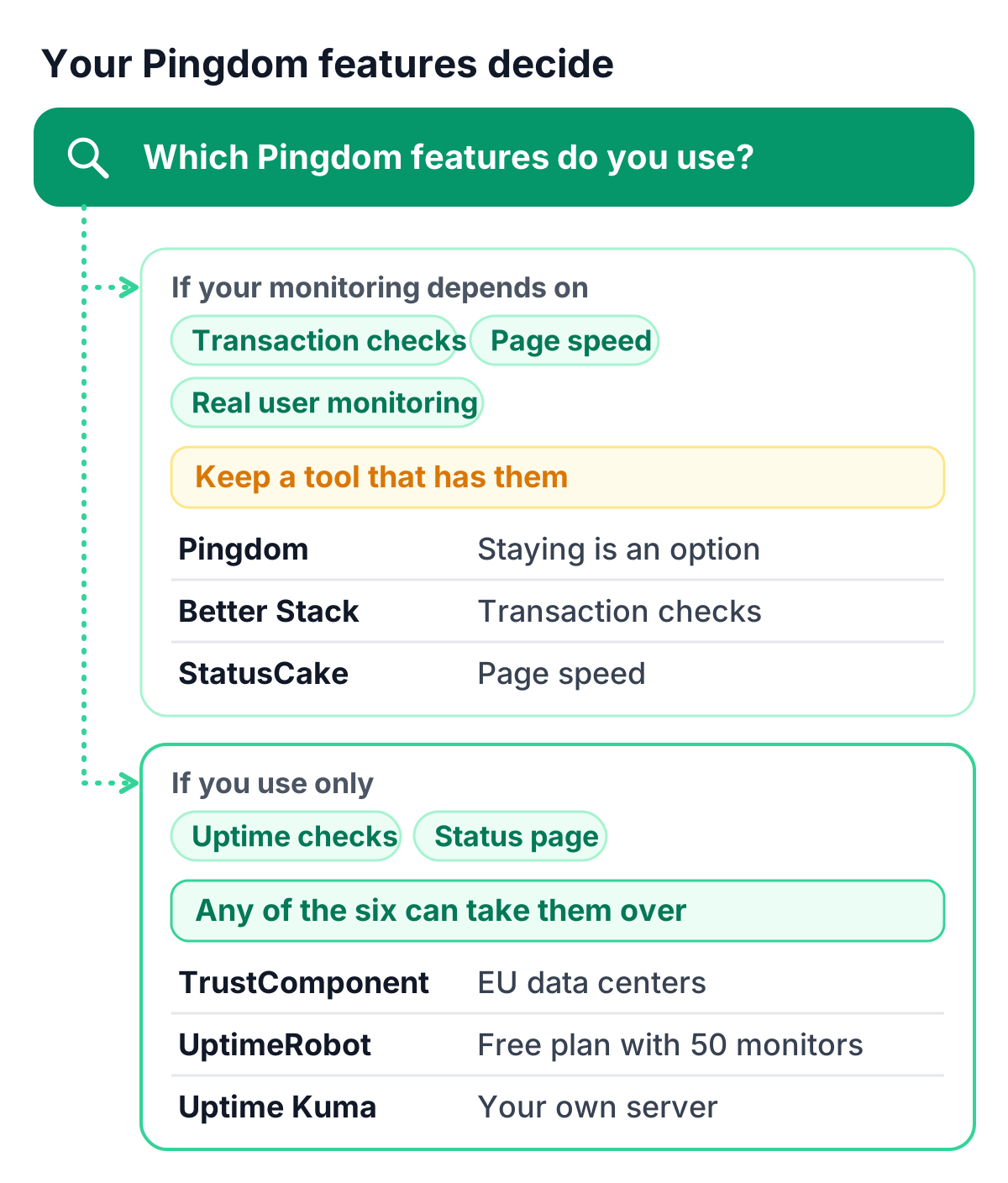
If your monitoring depends on Pingdom’s transaction checks, page speed monitoring or real user monitoring, keep a tool that has them, and that can mean staying with Pingdom. TrustComponent Monitoring has none of the three. It covers uptime, API, SSL, DNS, mail and heartbeat checks with status pages.
Pingdom alternatives compared
The table puts the six alternatives side by side, with Pingdom as the reference in the last row.
| Free plan or trial | Paid plans from | Shortest check interval | Check locations | Status pages | Data protection | |
|---|---|---|---|---|---|---|
| TrustComponent Monitoring | Free forever: 10 monitors, checks every 5 minutes; 14-day trial of paid plans | €9 a month for 10 monitors (Solo) | 30 seconds (Enterprise) | Multiple locations on paid plans | 1 on Free, 3 on Solo, 10 on Team, 100 on Enterprise | EU data centers, GDPR-compliant |
| UptimeRobot | Free: 50 monitors, checks every 5 minutes | €10 a month billed monthly, €9 billed annually (Solo, 10 monitors) | 15 seconds (Scale) | 4 regions on paid plans | 1 on Free, 3 on Solo, 100 on Team, unlimited on Scale | EU company; primary processing in the EU, secondary in the US |
| Better Stack | Free: 10 monitors, 10 heartbeats, 1 status page, checks every 3 minutes | $34 a month billed monthly, $29 billed annually (per responder license; paid plans include 10 monitors) | 30 seconds | 4 regions | 1 included, more at $15 a month each billed monthly ($12 billed annually) | Stored in EU regions by default; transfers to the US possible |
| StatusCake | Free: 10 uptime monitors, checks every 5 minutes; 7-day trial of paid plans | €19.99 a month billed monthly, €16.66 billed annually (Superior, 100 uptime monitors) | 30 seconds (Business) | 43 locations in 30 countries | Yes, with email, SMS and RSS subscriptions | Varies, needs legal review |
| Site24x7 | Free forever: uptime of up to 50 resources; 30-day trial | $10 a month, $9 paid annually (Web Uptime, 25 websites) | 1 minute (Web Uptime) | 32 locations (Web Uptime) | 3 on Web Uptime | Varies, needs legal review |
| Uptime Kuma | Free and open source (MIT license) | No paid plans; you host it yourself | 20 seconds | Wherever you run it | Several, on your own domains | Your own servers |
| Pingdom (for comparison) | 30-day free trial with Synthetics and RUM | Smallest plan: 10 uptime checks, 1 advanced check, 50 SMS | 1 minute | More than 100 probe servers | Public status pages in all plans | Varies, needs legal review |
Prices per month in each vendor’s currency. TrustComponent lists monthly prices, plus VAT. UptimeRobot shows euro prices to visitors from euro regions; its US dollar prices differ. Pingdom’s row describes Synthetic Monitoring; real user monitoring is a separate product.
What Pingdom does well
Pingdom is the uptime and performance monitoring service of SolarWinds. It sells Synthetic Monitoring and Real User Monitoring separately, each priced by volume, so you can combine what you need. Its strengths are real:
- Check locations: more than 100 probe servers worldwide, and you choose the regions your checks run from.
- Transaction and page speed checks: the Synthetic plan includes transaction monitoring and page speed monitoring next to uptime checks.
- Status pages and users: public status pages and reports are included in all plans, together with maintenance windows and unlimited users.
- Check types: HTTP(S) and custom HTTP checks, ping, TCP, UDP, DNS, and mail server checks over SMTP, POP3 and IMAP.
- Real user monitoring: a separate product that measures what actual visitors experience, from 100,000 pageviews with 13-month data retention.
The smallest Synthetic Monitoring plan includes 10 uptime checks, 1 advanced check and 50 SMS, and the price grows with the number of checks and SMS, up to 30,000 uptime checks. Real user monitoring starts at 100,000 pageviews, and a 30-day free trial covers both products. The shortest check interval is one minute, and alerts go out by email, SMS, mobile push and app integrations.
Why teams look for a Pingdom alternative
Teams that use Pingdom’s whole Synthetic plan, with transaction and page speed checks, get a lot from one tool. Teams that mostly run uptime checks and a status page tend to look around for one of these reasons:
- A free plan to start with. Pingdom starts with a 30-day trial. UptimeRobot, Better Stack, StatusCake, Site24x7 and TrustComponent Monitoring have free plans, and Uptime Kuma is free to run yourself.
- Uptime checks only. The Synthetic plan bundles uptime, transaction and page speed monitoring. If your account holds uptime checks only, a tool built around uptime monitors and status pages can fit your use just as well.
- Data processed in the EU. Pingdom is run by SolarWinds, which has its headquarters in Austin, Texas, and where Pingdom stores customer data needs a legal review. Some alternatives process data in the EU, as the data section below shows.
- Running it yourself. Some teams want no subscription at all and are happy to look after a monitoring server of their own.
Before you compare prices, check which Pingdom features your account actually uses. That list decides which alternatives are open to you.
Uptime checks vs transaction checks
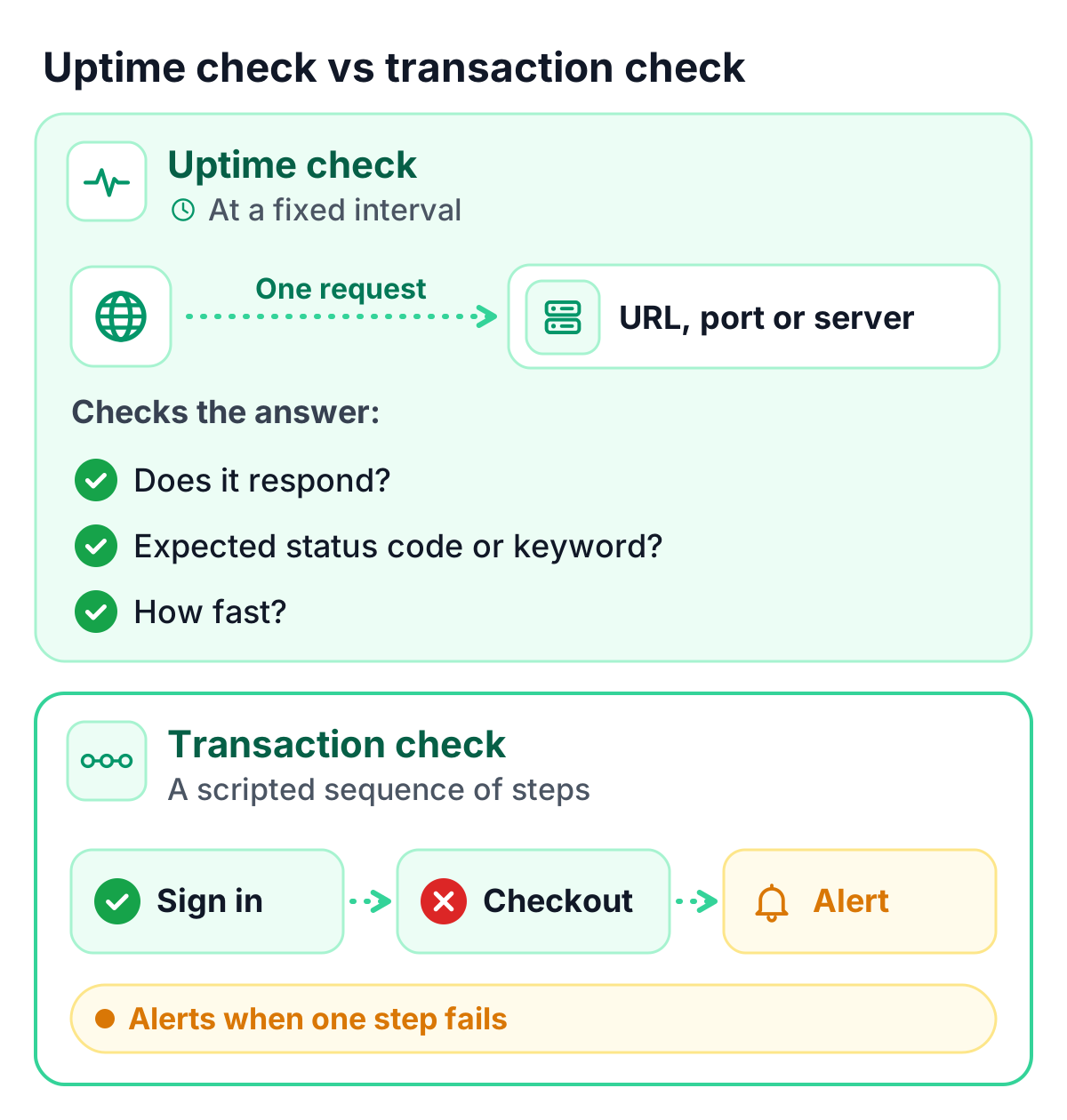
This difference decides how easy a switch is. An uptime check sends one request to a URL, a port or a server at a fixed interval and looks at the answer: does it respond, does it return the expected status code or keyword, and how long does it take. API checks go a step further and check values in a JSON response. A transaction check runs a scripted sequence of steps, such as signing in or completing a checkout, and alerts when one of the steps fails. Page speed checks measure how long a page takes to load.
If your Pingdom account holds uptime checks only, any of the six alternatives can take them over. If it holds transaction or page speed checks, look closely before you switch. Better Stack offers transaction checks written with Playwright and billed per browser minute, and StatusCake includes page speed monitors from its free plan up. TrustComponent Monitoring has no transaction, multi-step or page speed checks, so those checks would have to stay in a tool that has them.
The six Pingdom alternatives
1. TrustComponent Monitoring
TrustComponent Monitoring is uptime and website monitoring with status pages, hosted in the EU and part of the same platform as TrustCaptcha and the VAT Checker. Paid plans cover up to 16 check types: HTTP(S), keyword, ping, TCP, UDP, DNS, DNSBL, SSL certificate, domain expiry, heartbeat for cron jobs, SMTP, IMAP, POP3, SSH, FTP and NTP. Solo includes 14 of them, and keyword and DNSBL checks start with Team. The Free plan runs HTTP, ping and TCP checks.
Status pages come with every plan: one on Free, 3 on Solo, 10 on Team and 100 on Enterprise, each in 10 languages, with your own domain and branding from Solo. Status page subscribers start with Team (500 on Team, 2,500 on Enterprise), and Team also adds escalation rules of up to 20 steps and PDF uptime reports. Plans are priced in euros per month, plus VAT: Free with 10 monitors, Solo at €9 for 10 monitors or €19 for 50, Team at €39 for 100, and Enterprise at €79 for 200 or €189 for 500. Monitoring data is stored and processed in EU data centers.
It suits teams in the EU that use Pingdom for uptime checks and a status page and want both in one plan, with monitoring data kept in EU data centers. Watch for three limits: there are no transaction checks, page speed checks or real user monitoring; the shortest interval is one minute on Solo and Team and 30 seconds on Enterprise; and paid plans check from multiple locations, with each location counting as one monitor, while the Free plan checks from one location.
2. UptimeRobot
UptimeRobot is run by UptimeRobot s. r. o. in Bratislava, Slovakia, an EU company. Its free plan has 50 monitors with 5-minute checks for HTTP, port, ping and keyword monitoring, and one status page on an UptimeRobot address. Solo costs €10 a month billed monthly (€9 billed annually) for 10 monitors and adds 60-second checks, all monitor types including SSL and DNS, and 3 status pages on your own domain. Team, at €41 a month (€35 billed annually) for 100 monitors, checks every 30 seconds and includes 3 seats; Scale goes down to 15 seconds. A REST API for managing monitors and incidents is included on every plan, the free one too.
It suits teams that want many monitors on a small budget, or API access to their monitoring setup. Watch for the plan limits: the free plan has no SSL, domain expiry, DNS or heartbeat monitoring and no checks from several locations, and status pages on Solo have no password protection, subscribers or white-label, which start with Team. UptimeRobot’s DPA names the EU as the primary processing location and the US as a secondary one. Our comparison of UptimeRobot alternatives goes into more detail.
3. Better Stack
Better Stack, Inc., a Delaware corporation, combines uptime monitoring with incident management, on-call and status pages. Paid access is sold per responder license at $34 a month billed monthly or $29 billed annually, with unlimited phone-call and SMS alerts included, and further team members are free. Paid plans include 10 monitors, and each extra 50 monitors cost $25 a month ($21 billed annually). Checks run as often as every 30 seconds from 4 regions and cover HTTP(S) with keywords, TCP and UDP ports, SMTP, IMAP and POP3, SSL, domain expiration, DNS, ping and heartbeats. Transaction checks are written with Playwright and billed per browser minute, at $1 for 100 minutes. The free plan has 10 monitors, 10 heartbeats and a status page with 3-minute checks.
It suits teams that want on-call scheduling and incident management in the same tool as their checks, and teams that need transaction checks after leaving Pingdom. Watch for how costs add up: pricing grows with responders and monitors, and status page extras are charged per page, such as $15 a month for each additional public page, $50 for password protection and $250 for white-label ($12, $42 and $208 billed annually). Better Stack labels its free plan “for personal projects”. Data is stored in EU regions by default, and its DPA allows processing in the US and other locations.
4. StatusCake
StatusCake is run by TrafficCake Limited, a company registered in England and Wales. Next to uptime checks, its plans include page speed, domain and SSL monitors, which matters if you use Pingdom’s page speed checks. The free plan has 10 uptime monitors at 5-minute intervals plus one page speed, one domain and one SSL monitor. Superior costs €19.99 a month billed monthly (€16.66 billed annually) for 100 uptime monitors at 1-minute intervals, and Business costs €69.99 (€58.33 billed annually) for 300 uptime monitors at 30-second intervals. Tests run from 43 locations in 30 countries, and status pages offer email, SMS and RSS subscriptions, protected by a password or an IP access list if you like. Every plan can be tested for 7 days without a credit card.
It suits teams that want uptime and page speed monitoring together, checked from many locations. Watch for the team limits and the contract terms: Superior includes 1 team member and Business 9, and subscriptions renew automatically, with cancellation due at least 70 days before renewal. StatusCake’s DPA says personal data may be processed or accessed outside the UK and the EEA.
5. Site24x7
Site24x7 is a monitoring product of Zoho Corporation. Its entry plan, Web Uptime, costs $10 a month or $9 a month paid annually and covers 25 websites with 1-minute checks from 32 monitoring locations and 3 status pages. A free forever plan monitors the uptime of up to 50 resources with email alerts, and paid plans start with a 30-day free trial.
It suits teams that want many check locations on an entry plan. Check which Site24x7 plan covers the Pingdom features you use, such as transaction checks or real user monitoring. Where the data is stored needs a legal review.
6. Uptime Kuma
Uptime Kuma is an open-source, self-hosted monitoring tool under the MIT license. It runs with Docker or Node.js on Linux or Windows and checks HTTP(S), TCP, keywords, JSON queries, WebSockets, ping, DNS records, push monitors, Docker containers and Steam game servers at 20-second intervals. Notifications reach you through more than 90 services, among them Telegram, Discord, Slack, Pushover and email over SMTP, and you can run several status pages mapped to your own domains.
It suits teams that want full control and no subscription, and are comfortable running one more service. Watch for the work that comes with self-hosting: you install, update and secure it yourself, the checks run from wherever you host it, and SMS alerts run through the third-party services in its notification list. Our guide to open source status pages weighs self-hosting against a hosted page.
Which Pingdom alternatives keep data in the EU?
TrustComponent processes monitoring data in EU data centers on every plan. Better Stack stores data in EU regions by default, and UptimeRobot, an EU company, names the EU as its primary processing location; both DPAs also allow processing in the United States. Uptime Kuma keeps the data on whichever servers you run it on. For Pingdom, StatusCake and Site24x7, the data location needs a legal review.
Where data is processed is only one part of the picture. Alert contacts and status page subscribers are personal data, and your privacy policy and records of processing have to cover them. This section is not legal advice; clear these points with your data protection officer. Uptime monitoring hosted in the EU keeps the list of open questions short.
Moving from Pingdom
Moving to another uptime tool means recreating your checks. Plan it as a short project:
- List what you have. Write down every Pingdom check with its URL or host, check type, interval and regions, plus the alert contacts and integrations it uses. Note your status page components and maintenance windows too.
- Decide what moves. Uptime checks can move to any of the alternatives; for port, DNS and mail server checks, compare the check types each tool lists. Transaction and page speed checks need a tool that offers them.
- Recreate the checks. Set each check up again in the new tool. In TrustComponent Monitoring you create monitors in the dashboard; there is no import from other tools.
- Rebuild alerts and the status page. Add your alert contacts and escalation, then build the status page with the same components, so customers find what they know.
- Run both in parallel. Keep Pingdom running for a week or two and compare alerts, response times and uptime figures.
- Switch. Point your status page domain to the new page, tell subscribers about the change and turn off the Pingdom checks.
How TrustComponent Monitoring fits
If you use Pingdom for uptime checks, alerts and a public status page, TrustComponent Monitoring covers that with up to 16 check types, status pages on every plan and monitoring data processed in EU data centers, on the same platform as TrustCaptcha and the VAT Checker. It does not replace Pingdom’s transaction checks, page speed monitoring or real user monitoring, and it checks from multiple locations, fewer than Pingdom’s more than 100 probe servers. If those features are central to your setup, Pingdom or an alternative above that offers them is the better fit.
Pingdom, SolarWinds, UptimeRobot, Better Stack, StatusCake, Site24x7, Zoho, Uptime Kuma and the other product names mentioned are trademarks of their respective owners. TrustComponent is not affiliated with them.
Get started
Start on the Free plan with 10 monitors and a status page, free forever and without a credit card, or test a paid plan free for 14 days. Recreate your most important Pingdom checks first and run both side by side. Compare the Monitoring plans to see which one matches your checks.