

'%3e%3crect%20width='32'%20height='24'%20fill='white'/%3e%3cpath%20fill-rule='evenodd'%20clip-rule='evenodd'%20d='M0%200V24H32V0H0Z'%20fill='%232E42A5'/%3e%3cmask%20id='mask0_270_67386'%20style='mask-type:luminance'%20maskUnits='userSpaceOnUse'%20x='0'%20y='0'%20width='32'%20height='24'%3e%3cpath%20fill-rule='evenodd'%20clip-rule='evenodd'%20d='M0%200V24H32V0H0Z'%20fill='white'/%3e%3c/mask%3e%3cg%20mask='url(%23mask0_270_67386)'%3e%3cpath%20d='M-3.56323%2022.2854L3.47846%2025.2635L32.1597%203.23787L35.874%20-1.18761L28.344%20-2.18297L16.6456%207.3085L7.22956%2013.7035L-3.56323%2022.2854Z'%20fill='white'/%3e%3cpath%20d='M-2.59924%2024.3719L0.988173%2026.1001L34.5402%20-1.59881H29.5031L-2.59924%2024.3719Z'%20fill='%23F50100'/%3e%3cpath%20d='M35.5631%2022.2854L28.5214%2025.2635L-0.159817%203.23787L-3.87415%20-1.18761L3.65593%20-2.18297L15.3543%207.3085L24.7703%2013.7035L35.5631%2022.2854Z'%20fill='white'/%3e%3cpath%20d='M35.3229%2023.7829L31.7355%2025.5111L17.4487%2013.6518L13.2129%2012.3267L-4.23151%20-1.17246H0.805637L18.2403%2012.0063L22.8713%2013.5952L35.3229%2023.7829Z'%20fill='%23F50100'/%3e%3cmask%20id='path-7-inside-1_270_67386'%20fill='white'%3e%3cpath%20fill-rule='evenodd'%20clip-rule='evenodd'%20d='M19.7777%20-2H12.2222V8H-1.97253V16H12.2222V26H19.7777V16H34.0275V8H19.7777V-2Z'/%3e%3c/mask%3e%3cpath%20fill-rule='evenodd'%20clip-rule='evenodd'%20d='M19.7777%20-2H12.2222V8H-1.97253V16H12.2222V26H19.7777V16H34.0275V8H19.7777V-2Z'%20fill='%23F50100'/%3e%3cpath%20d='M12.2222%20-2V-4H10.2222V-2H12.2222ZM19.7777%20-2H21.7777V-4H19.7777V-2ZM12.2222%208V10H14.2222V8H12.2222ZM-1.97253%208V6H-3.97253V8H-1.97253ZM-1.97253%2016H-3.97253V18H-1.97253V16ZM12.2222%2016H14.2222V14H12.2222V16ZM12.2222%2026H10.2222V28H12.2222V26ZM19.7777%2026V28H21.7777V26H19.7777ZM19.7777%2016V14H17.7777V16H19.7777ZM34.0275%2016V18H36.0275V16H34.0275ZM34.0275%208H36.0275V6H34.0275V8ZM19.7777%208H17.7777V10H19.7777V8ZM12.2222%200H19.7777V-4H12.2222V0ZM14.2222%208V-2H10.2222V8H14.2222ZM-1.97253%2010H12.2222V6H-1.97253V10ZM0.0274658%2016V8H-3.97253V16H0.0274658ZM12.2222%2014H-1.97253V18H12.2222V14ZM14.2222%2026V16H10.2222V26H14.2222ZM19.7777%2024H12.2222V28H19.7777V24ZM17.7777%2016V26H21.7777V16H17.7777ZM34.0275%2014H19.7777V18H34.0275V14ZM32.0275%208V16H36.0275V8H32.0275ZM19.7777%2010H34.0275V6H19.7777V10ZM17.7777%20-2V8H21.7777V-2H17.7777Z'%20fill='white'%20mask='url(%23path-7-inside-1_270_67386)'/%3e%3c/g%3e%3c/g%3e%3cdefs%3e%3cclipPath%20id='clip0_270_67386'%3e%3crect%20width='32'%20height='24'%20fill='white'/%3e%3c/clipPath%3e%3c/defs%3e%3c/svg%3e)
'%3e%3crect%20width='32'%20height='24'%20fill='white'/%3e%3cpath%20fill-rule='evenodd'%20clip-rule='evenodd'%20d='M0%2016H32V24H0V16Z'%20fill='%23FFD018'/%3e%3cpath%20fill-rule='evenodd'%20clip-rule='evenodd'%20d='M0%208H32V16H0V8Z'%20fill='%23E31D1C'/%3e%3cpath%20fill-rule='evenodd'%20clip-rule='evenodd'%20d='M0%200H32V8H0V0Z'%20fill='%23272727'/%3e%3c/g%3e%3cdefs%3e%3cclipPath%20id='clip0_270_67353'%3e%3crect%20width='32'%20height='24'%20fill='white'/%3e%3c/clipPath%3e%3c/defs%3e%3c/svg%3e)
'%3e%3crect%20width='32'%20height='24'%20fill='white'/%3e%3cpath%20fill-rule='evenodd'%20clip-rule='evenodd'%20d='M22%200H32V24H22V0Z'%20fill='%23F50100'/%3e%3cpath%20fill-rule='evenodd'%20clip-rule='evenodd'%20d='M0%200H12V24H0V0Z'%20fill='%232E42A5'/%3e%3cpath%20fill-rule='evenodd'%20clip-rule='evenodd'%20d='M10%200H22V24H10V0Z'%20fill='%23F7FCFF'/%3e%3c/g%3e%3cdefs%3e%3cclipPath%20id='clip0_270_67361'%3e%3crect%20width='32'%20height='24'%20fill='white'/%3e%3c/clipPath%3e%3c/defs%3e%3c/svg%3e)
What is the best UptimeRobot alternative?
There is no single best one, because teams switch for different reasons. UptimeRobot is run by UptimeRobot s. r. o. in Bratislava, Slovakia, and its Free plan has 50 monitors for any use, commercial included. Which alternative fits depends on what you are missing:

- Status pages with subscribers, and monitoring data stored and processed in the EU: TrustComponent Monitoring.
- On-call, incident management and status pages in one license, with unlimited phone and SMS alerts: Better Stack.
- Many monitors per plan and many check locations: StatusCake, with 100 uptime monitors on its Superior plan and 43 test locations.
- Uptime, transaction and page speed checks plus real user monitoring from one vendor: Pingdom.
- Free software on your own server: Uptime Kuma.
- A large free plan, and 32 locations on a $10 entry plan: Site24x7.
If a large free plan is all you need, UptimeRobot may well remain the better fit. The sections below show where each option differs, so you can decide with the numbers in front of you.
UptimeRobot alternatives compared
The table puts the six alternatives next to each other, with UptimeRobot as the reference in the last row.
| Free plan or trial | Paid plans from | Fastest check interval | Status pages | Check locations | Data protection | |
|---|---|---|---|---|---|---|
| TrustComponent Monitoring | 10 monitors every 5 min, 1 status page | €9 a month plus VAT (Solo, 10 monitors) | 30 s on Enterprise; 1 min on Solo and Team | 1 to 100 by plan; subscribers from Team | Multiple on paid plans, 1 on Free | EU data centers, GDPR-compliant |
| Better Stack | 10 monitors and 10 heartbeats every 3 min, 1 status page | $34 a month billed monthly, $29 billed annually (per responder license; paid plans include 10 monitors) | 30 s | 1 included, more at $15 a month each billed monthly ($12 billed annually); 1,000 subscribers included | 4 regions | Data stored in the EU by default; its DPA allows transfers to the USA |
| StatusCake | 10 uptime monitors every 5 min | €19.99 a month billed monthly, €16.66 billed annually (Superior, 100 monitors) | 30 s on Business; 1 min on Superior | Yes, with email, SMS and RSS subscriptions | 43 locations | Varies, needs legal review |
| Pingdom | 30-day free trial | Smallest plan: 10 uptime checks, 1 advanced check, 50 SMS | 1 min | Public status pages on all plans | More than 100 probe servers | Varies, needs legal review |
| Uptime Kuma | Free open-source software (MIT), self-hosted | No paid plan; you run your own server | 20 s | Multiple, on your own domains | Where your server runs | Runs on your own server |
| Site24x7 | Uptime of up to 50 resources, email alerts | $10 a month, or $9 a month paid annually (Web Uptime, 25 websites) | 1 min on Web Uptime | 3 on Web Uptime | 32 on Web Uptime | Varies, needs legal review |
| UptimeRobot (for comparison) | 50 monitors every 5 min, 1 status page | €10 a month billed monthly, €9 billed annually (Solo, 10 monitors) | 15 s on Scale; 30 s on Team, 60 s on Solo | 1 to unlimited by plan; subscribers from Team | 4 regions on paid plans | Primary processing in the EU, secondary in the USA under its DPA |
Each row shows the vendor’s smallest paid plan and its fastest interval with the plan it needs, in the vendor’s own currency. TrustComponent prices exclude VAT, and UptimeRobot sets its euro prices for euro regions.
When UptimeRobot’s free plan is enough
Before you switch, check whether you need to. UptimeRobot s. r. o. is an EU company based in Bratislava, and its terms are governed by Slovak law. Its Free plan is hard to match: 50 monitors with HTTP, port, ping and keyword checks every 5 minutes, and the terms allow any use, including commercial. Among the hosted alternatives here, Site24x7’s free plan comes closest with up to 50 resources. Better Stack, StatusCake and TrustComponent Monitoring include 10 monitors for free, and Pingdom starts with a 30-day trial.
If basic checks on many free monitors cover what you need, staying on UptimeRobot’s Free plan is a sound choice. Once you need SSL, DNS or heartbeat checks, status page subscribers or data processed only in the EU, compare the paid plans below.
Why teams look for an UptimeRobot alternative
The reasons usually come down to one specific need that sits on a higher plan or outside the product:
- More than basic checks for free. The Free plan has no SSL or domain expiry, DNS, heartbeat or API monitoring, no multi-location checks and no maintenance windows, and its monthly email reports stop after the first 3 months.
- Status page subscribers. The free status page runs on an UptimeRobot URL. Your own domain comes with Solo, while subscribers, password protection and white-label start with Team.
- Where data is processed. UptimeRobot’s DPA names the EU as the primary processing location and the USA as the secondary one, through sub-processors such as AWS, DigitalOcean, Hetzner and Limestone Networks. Teams that want monitoring data stored and processed in the EU look for a provider that does exactly that.
- Other tools in one place. Some teams want on-call and incident management in the same tool as their checks, others want software they run themselves.
How to choose an alternative to UptimeRobot
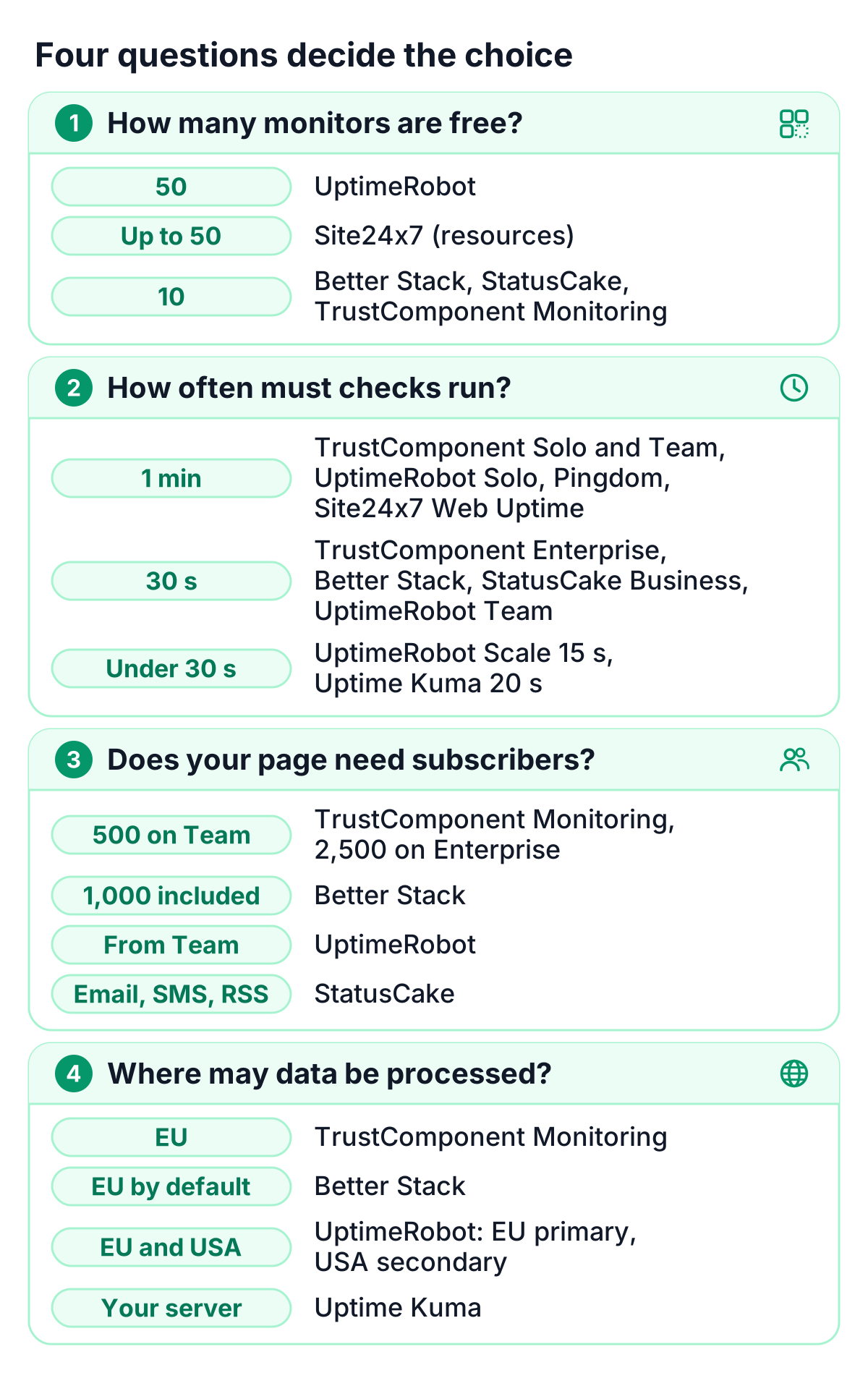
Four questions decide most cases.
How many free monitors do you need? If you want to stay free with more than 10 monitors, UptimeRobot (50) and Site24x7 (up to 50 resources) are the hosted options. Better Stack, StatusCake and TrustComponent Monitoring include 10, and Uptime Kuma costs nothing beyond the server you run it on.
How often must checks run? TrustComponent Monitoring checks every minute on Solo and Team and every 30 seconds on Enterprise. Every 30 seconds is also available on Better Stack’s paid license, StatusCake’s Business plan and UptimeRobot’s Team plan, and Pingdom and Site24x7’s Web Uptime plan check once a minute. Shorter intervals come with UptimeRobot’s Scale plan (15 seconds) and self-hosted Uptime Kuma (20 seconds).
Does your status page need subscribers? If customers should hear about incidents without checking the page, look at subscriber limits. TrustComponent Monitoring includes 500 subscribers on Team and 2,500 on Enterprise, Better Stack includes 1,000, and StatusCake offers email, SMS and RSS subscriptions. At UptimeRobot, subscribers start with Team.
Where may monitoring data be processed? TrustComponent Monitoring stores and processes data in the EU on ISO 27001-certified infrastructure. Better Stack stores data in the EU by default, and its DPA allows transfers to the USA. UptimeRobot names the EU as primary and the USA as secondary location, StatusCake’s DPA allows processing outside the UK and EEA, and Uptime Kuma keeps data on your own server. For Pingdom and Site24x7, the data location needs a legal review. Whether a setup meets the GDPR depends on how you use it; this is not legal advice, so check it with your data protection officer.
The six UptimeRobot alternatives
1. TrustComponent Monitoring
TrustComponent Monitoring is website and uptime monitoring with hosted status pages for business teams in the EU. The Free plan includes 10 monitors with HTTP, ping and TCP checks every 5 minutes and one status page, free forever and without a credit card. Solo adds 1-minute checks and 14 check types, from SSL certificate, domain expiry, DNS and heartbeat checks to mail server (SMTP, IMAP, POP3), SSH, FTP and NTP checks, plus 3 status pages on your own domain with your branding. Team adds keyword and DNSBL checks, 10 status pages with 500 subscribers, escalation with up to 20 steps per rule and PDF uptime reports. Enterprise checks every 30 seconds and includes 100 status pages with 2,500 subscribers.
Status pages come in 10 languages on every plan. Monitoring data is stored and processed in the EU on ISO 27001-certified infrastructure, also for checks that run from locations outside the EU, and the Data Processing Agreement is available online. Paid plans start with a 14-day free trial.
It suits EU teams that want uptime checks, status pages and subscriber notifications in one tool, with monitoring data kept in the EU. Good to know: Free checks from one location, Solo and Team check every minute and Enterprise every 30 seconds, and each check location counts as one monitor.
2. Better Stack
Better Stack, Inc., a Delaware corporation, combines uptime monitoring with incident management, on-call and status pages. Paid access is billed per responder license: $34 a month billed monthly or $29 billed annually, with unlimited phone call and SMS alerts and team members at no charge. Paid plans include 10 monitors, 10 heartbeats and 1 status page with 1,000 subscribers, and each further 50 monitors cost $25 a month ($21 billed annually). Checks run as often as every 30 seconds from 4 regions, and the check types range from HTTP keyword, TCP and UDP, mail, SSL, TLD expiration, DNS and ping checks to Playwright transaction checks billed per browser minute. Better Stack says it stores all data in EU regions by default.
It suits teams that want on-call and incident handling in the same tool as their checks. Watch for the free plan, which Better Stack labels “Free for personal projects”, and for status page extras priced per page: another public page costs $15 a month ($12 billed annually), and removing the Better Stack footer costs $250 per page a month ($208 billed annually).
3. StatusCake
StatusCake is run by TrafficCake Limited in Grays, United Kingdom. Its Free plan has 10 uptime monitors with 5-minute intervals, plus one page speed, one domain and one SSL monitor. Superior costs €16.66 a month billed annually or €19.99 billed monthly and includes 100 uptime monitors with 1-minute intervals and 50 domain and 50 SSL monitors. Business, at €58.33 a month billed annually or €69.99 billed monthly, has 300 uptime monitors and 30-second intervals. Tests run from 43 locations in 30 countries, status pages offer email, SMS and RSS subscriptions with a password or IP access list, and every plan can be tried for 7 days without a credit card.
It suits teams that want many monitors per plan, with domain, SSL and page speed monitors in the same subscription. Watch for two things: 30-second checks start with Business, and subscriptions renew automatically and should be cancelled at least 70 days before renewal.
4. Pingdom
Pingdom is a SolarWinds product, operated by SolarWinds Worldwide, LLC; SolarWinds has its headquarters in Austin, Texas. Synthetic monitoring and real user monitoring are bought separately and scale by volume. The smallest synthetic tier has 10 uptime checks, 1 advanced check and 50 SMS, and the price grows with the number of checks and SMS. Synthetic plans include transaction and page speed monitoring, email and SMS alerts, maintenance windows, public status pages and unlimited users. Checks run from more than 100 probe servers, and the check types include HTTP(S), ping, TCP, UDP, DNS and mail server checks. A 30-day free trial covers synthetics and RUM.
It suits teams that want uptime, transaction and page speed checks and real user monitoring from one vendor, with unlimited users. Watch for the scale of the entry tier: it covers 10 uptime checks at a 1-minute interval, so larger setups need a higher tier. Our overview of Pingdom alternatives goes into more detail.
5. Uptime Kuma
Uptime Kuma is a self-hosted, open-source monitoring tool under the MIT license that runs with Docker or Node.js on Linux or Windows. It checks HTTP(S), TCP, keywords, JSON queries, WebSockets, ping, DNS records, push monitors, Steam game servers and Docker containers at 20-second intervals. Notifications go out through more than 90 services, among them Telegram, Discord, Slack and email, and you can run multiple status pages on your own domains.
It suits developers and small teams that want a free tool and full control over where it runs, since the data stays on the server you choose. Watch for the work that comes with it: you install, update, secure and back up the instance yourself, and the checks come from wherever that server sits, so it should run outside the infrastructure it watches. Our guide to open source status pages covers that trade-off.
6. Site24x7
Site24x7 is a Zoho Corporation product. Its free forever plan monitors the uptime of up to 50 resources with email alerts. The Web Uptime plan costs $10 a month, or $9 a month paid annually, and covers 25 websites with 1-minute polling from 32 monitoring locations and 3 status pages. A 30-day free trial is available.
It suits teams that want a large free plan or many check locations on a $10 entry plan. Watch for the limits of the entry plan: 25 websites and a 1-minute interval.
UptimeRobot and TrustComponent Monitoring prices for 10 to 100 monitors
Between 10 and 100 monitors, TrustComponent Monitoring costs less than UptimeRobot on monthly billing. The table compares the monthly price at each monitor count, with UptimeRobot’s annual billing in the last column.
| Monitors | TrustComponent Monitoring | UptimeRobot, billed monthly | UptimeRobot, billed annually |
|---|---|---|---|
| 10 | €9 (Solo) | €10 (Solo) | €9 (Solo) |
| 50 | €19 (Solo) | €22 (Solo) | €19 (Solo) |
| 100 | €39 (Team) | €41 (Team) | €35 (Team) |
Prices per month in euros. TrustComponent lists monthly prices that exclude VAT, and UptimeRobot sets its euro prices for euro regions. On TrustComponent, each check location counts as one monitor.
On monthly billing, TrustComponent costs €1 less at 10 monitors, €3 less at 50 and €2 less at 100. TrustComponent lists monthly prices only.
The plans also differ in what they include, for example in check intervals and the number of status pages, so compare the features you need. TrustComponent Team includes 3 seats, all 16 check types, 10 status pages with 500 subscribers, escalation with up to 20 steps and PDF uptime reports, and its monitoring data is stored and processed in the EU. White-label and password protection for status pages come with the Status Page Pro add-on at €79 a month.
How TrustComponent Monitoring fits
TrustComponent Monitoring fits when status pages, check coverage and the data location carry your decision:
- Status pages on every plan: your own domain and branding from Solo, subscribers from Team, 10 languages.
- 16 check types on Team: HTTP(S), keyword, SSL certificate, domain expiry, DNS, DNSBL, heartbeat, mail server, SSH, FTP, NTP and more.
- Alerts that reach someone: escalation with up to 20 steps from Team, and SMS and voice alerts through prepaid credits on every plan.
- Data in the EU: stored and processed in the EU on ISO 27001-certified infrastructure, with the Data Processing Agreement online.
See all monitoring features or compare the plans.
Switching from UptimeRobot
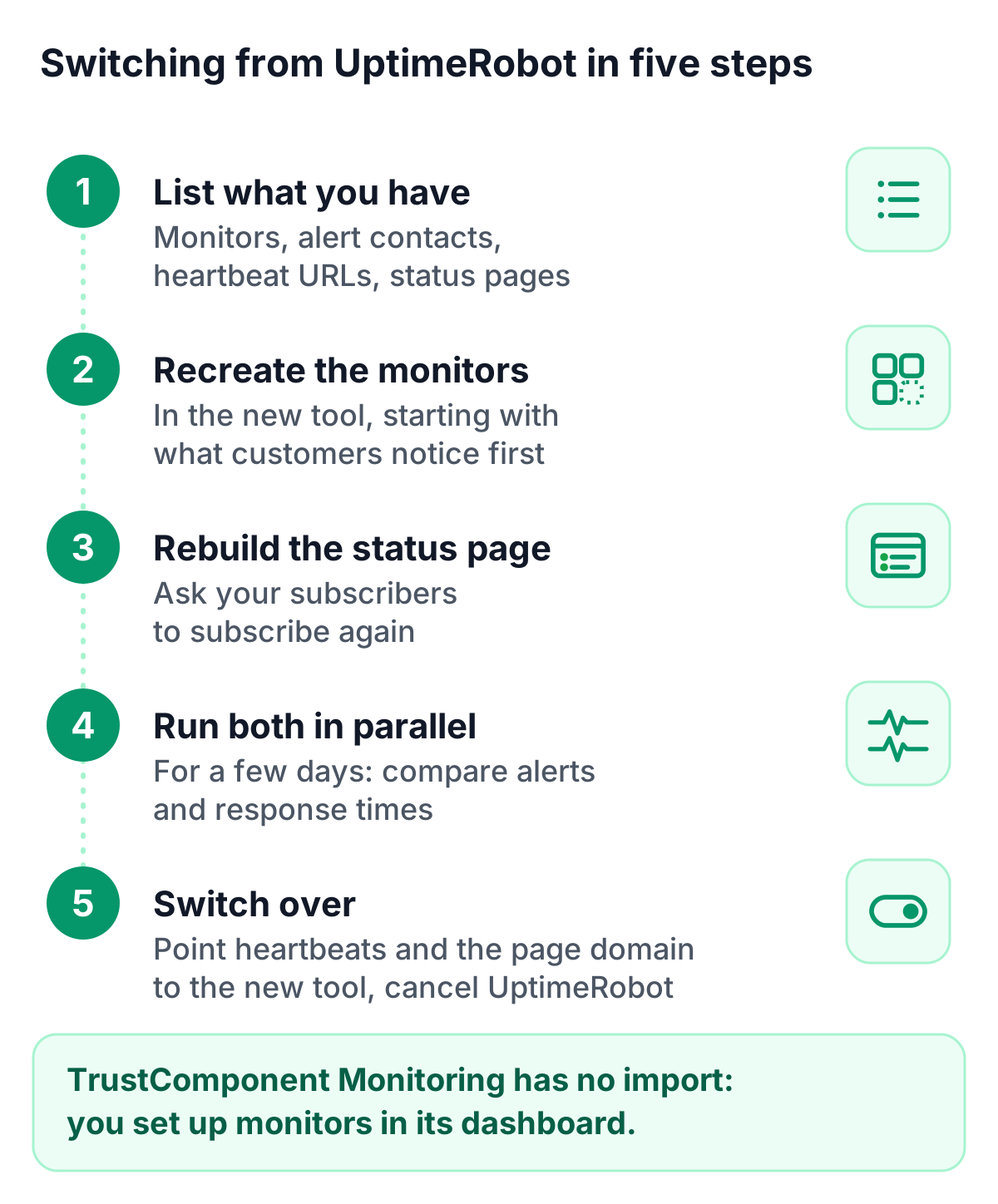
A switch takes a little planning, mostly because monitors, alerts and the status page have to be set up again.
- List what you have. Write down every monitor with its type, target, interval and alert settings, plus your alert contacts, integrations, maintenance windows and status pages. Note which cron jobs or scripts call UptimeRobot heartbeat URLs, and whether anything creates monitors through UptimeRobot’s API.
- Recreate the monitors. Set them up in the new tool, starting with the services your customers notice first. TrustComponent Monitoring has no import from other tools, so you create monitors in its dashboard, and monitors that scripts used to create through an API are set up there by hand as well.
- Rebuild the status page. Recreate its components and design, and tell your subscribers about the new page so they can subscribe again. If you would rather move subscriber email addresses, check with your data protection officer first.
- Run both in parallel for a few days. Compare alerts and response times, adjust thresholds and make sure every alert reaches the right person.
- Switch over. Point heartbeat URLs and your status page domain to the new tool, then pause your UptimeRobot monitors and cancel the plan.
UptimeRobot, Better Stack, StatusCake, Pingdom, Uptime Kuma, Site24x7 and the other product names mentioned are trademarks of their respective owners. TrustComponent is not affiliated with them.
Get started
The Free plan has 10 monitors and a status page, free forever, and every paid plan starts with a 14-day free trial. Start for free and run it next to UptimeRobot for a few days, or compare the plans and prices first.