

'%3e%3crect%20width='32'%20height='24'%20fill='white'/%3e%3cpath%20fill-rule='evenodd'%20clip-rule='evenodd'%20d='M0%200V24H32V0H0Z'%20fill='%232E42A5'/%3e%3cmask%20id='mask0_270_67386'%20style='mask-type:luminance'%20maskUnits='userSpaceOnUse'%20x='0'%20y='0'%20width='32'%20height='24'%3e%3cpath%20fill-rule='evenodd'%20clip-rule='evenodd'%20d='M0%200V24H32V0H0Z'%20fill='white'/%3e%3c/mask%3e%3cg%20mask='url(%23mask0_270_67386)'%3e%3cpath%20d='M-3.56323%2022.2854L3.47846%2025.2635L32.1597%203.23787L35.874%20-1.18761L28.344%20-2.18297L16.6456%207.3085L7.22956%2013.7035L-3.56323%2022.2854Z'%20fill='white'/%3e%3cpath%20d='M-2.59924%2024.3719L0.988173%2026.1001L34.5402%20-1.59881H29.5031L-2.59924%2024.3719Z'%20fill='%23F50100'/%3e%3cpath%20d='M35.5631%2022.2854L28.5214%2025.2635L-0.159817%203.23787L-3.87415%20-1.18761L3.65593%20-2.18297L15.3543%207.3085L24.7703%2013.7035L35.5631%2022.2854Z'%20fill='white'/%3e%3cpath%20d='M35.3229%2023.7829L31.7355%2025.5111L17.4487%2013.6518L13.2129%2012.3267L-4.23151%20-1.17246H0.805637L18.2403%2012.0063L22.8713%2013.5952L35.3229%2023.7829Z'%20fill='%23F50100'/%3e%3cmask%20id='path-7-inside-1_270_67386'%20fill='white'%3e%3cpath%20fill-rule='evenodd'%20clip-rule='evenodd'%20d='M19.7777%20-2H12.2222V8H-1.97253V16H12.2222V26H19.7777V16H34.0275V8H19.7777V-2Z'/%3e%3c/mask%3e%3cpath%20fill-rule='evenodd'%20clip-rule='evenodd'%20d='M19.7777%20-2H12.2222V8H-1.97253V16H12.2222V26H19.7777V16H34.0275V8H19.7777V-2Z'%20fill='%23F50100'/%3e%3cpath%20d='M12.2222%20-2V-4H10.2222V-2H12.2222ZM19.7777%20-2H21.7777V-4H19.7777V-2ZM12.2222%208V10H14.2222V8H12.2222ZM-1.97253%208V6H-3.97253V8H-1.97253ZM-1.97253%2016H-3.97253V18H-1.97253V16ZM12.2222%2016H14.2222V14H12.2222V16ZM12.2222%2026H10.2222V28H12.2222V26ZM19.7777%2026V28H21.7777V26H19.7777ZM19.7777%2016V14H17.7777V16H19.7777ZM34.0275%2016V18H36.0275V16H34.0275ZM34.0275%208H36.0275V6H34.0275V8ZM19.7777%208H17.7777V10H19.7777V8ZM12.2222%200H19.7777V-4H12.2222V0ZM14.2222%208V-2H10.2222V8H14.2222ZM-1.97253%2010H12.2222V6H-1.97253V10ZM0.0274658%2016V8H-3.97253V16H0.0274658ZM12.2222%2014H-1.97253V18H12.2222V14ZM14.2222%2026V16H10.2222V26H14.2222ZM19.7777%2024H12.2222V28H19.7777V24ZM17.7777%2016V26H21.7777V16H17.7777ZM34.0275%2014H19.7777V18H34.0275V14ZM32.0275%208V16H36.0275V8H32.0275ZM19.7777%2010H34.0275V6H19.7777V10ZM17.7777%20-2V8H21.7777V-2H17.7777Z'%20fill='white'%20mask='url(%23path-7-inside-1_270_67386)'/%3e%3c/g%3e%3c/g%3e%3cdefs%3e%3cclipPath%20id='clip0_270_67386'%3e%3crect%20width='32'%20height='24'%20fill='white'/%3e%3c/clipPath%3e%3c/defs%3e%3c/svg%3e)
'%3e%3crect%20width='32'%20height='24'%20fill='white'/%3e%3cpath%20fill-rule='evenodd'%20clip-rule='evenodd'%20d='M0%2016H32V24H0V16Z'%20fill='%23FFD018'/%3e%3cpath%20fill-rule='evenodd'%20clip-rule='evenodd'%20d='M0%208H32V16H0V8Z'%20fill='%23E31D1C'/%3e%3cpath%20fill-rule='evenodd'%20clip-rule='evenodd'%20d='M0%200H32V8H0V0Z'%20fill='%23272727'/%3e%3c/g%3e%3cdefs%3e%3cclipPath%20id='clip0_270_67353'%3e%3crect%20width='32'%20height='24'%20fill='white'/%3e%3c/clipPath%3e%3c/defs%3e%3c/svg%3e)
'%3e%3crect%20width='32'%20height='24'%20fill='white'/%3e%3cpath%20fill-rule='evenodd'%20clip-rule='evenodd'%20d='M22%200H32V24H22V0Z'%20fill='%23F50100'/%3e%3cpath%20fill-rule='evenodd'%20clip-rule='evenodd'%20d='M0%200H12V24H0V0Z'%20fill='%232E42A5'/%3e%3cpath%20fill-rule='evenodd'%20clip-rule='evenodd'%20d='M10%200H22V24H10V0Z'%20fill='%23F7FCFF'/%3e%3c/g%3e%3cdefs%3e%3cclipPath%20id='clip0_270_67361'%3e%3crect%20width='32'%20height='24'%20fill='white'/%3e%3c/clipPath%3e%3c/defs%3e%3c/svg%3e)
Introduction: open source, self-hosted or hosted?
When teams look for a status page or uptime monitoring, two paths appear: an open source status page you host yourself, or a hosted service. Both can work well. The right choice depends less on features than on how much operational work your team wants to own, and on how independent your monitoring needs to be from the systems it watches.
This guide explains what open source status pages and open source uptime monitoring involve, how they differ from hosted services, and which questions help you decide.
What is an open source status page?
An open source status page is status page software with publicly available source code. You install it on your own server or cloud account and run it yourself. A self hosted status page gives you full control: you decide how it looks, where it runs and where its data lives. Some projects focus on a public status page, others on an open source status dashboard for internal teams.
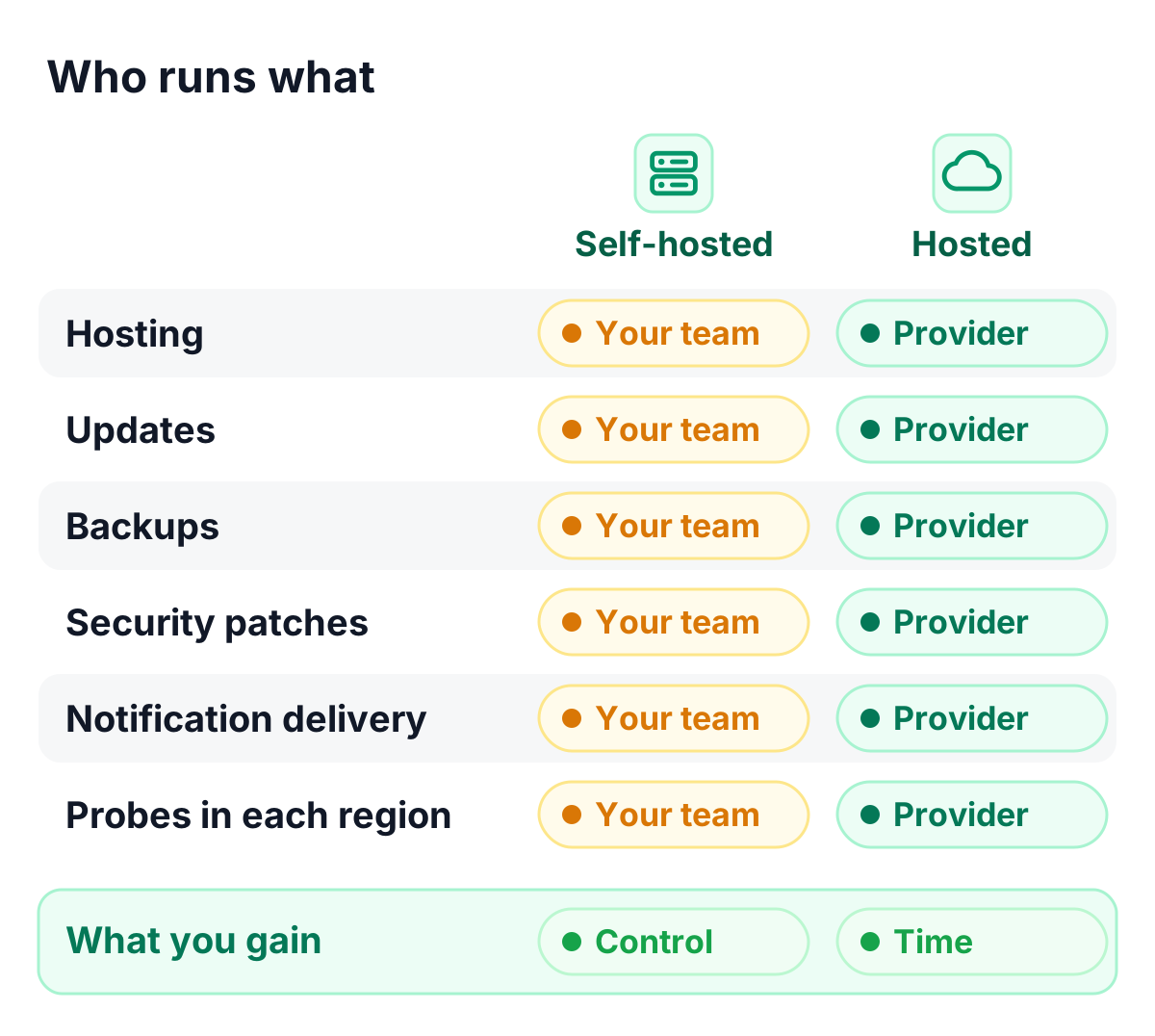
What you take on in return is the operation: hosting, updates, backups, security patches and the delivery of notifications.
Open source uptime monitoring and website monitoring
Uptime monitoring open source projects check your websites and services at regular intervals and alert you when something changes. Open source website monitoring and open source synthetic monitoring follow the same principle: scheduled checks against your endpoints, run from wherever you deploy the software.
Two details deserve attention:
- Check locations: checks run from the servers you deploy them on. For an outside-in view from several regions, you deploy and maintain probes in each region.
- Independence: a monitor that runs in the same data center as your services can miss exactly the outages it should report.
Open source server monitoring: a different job
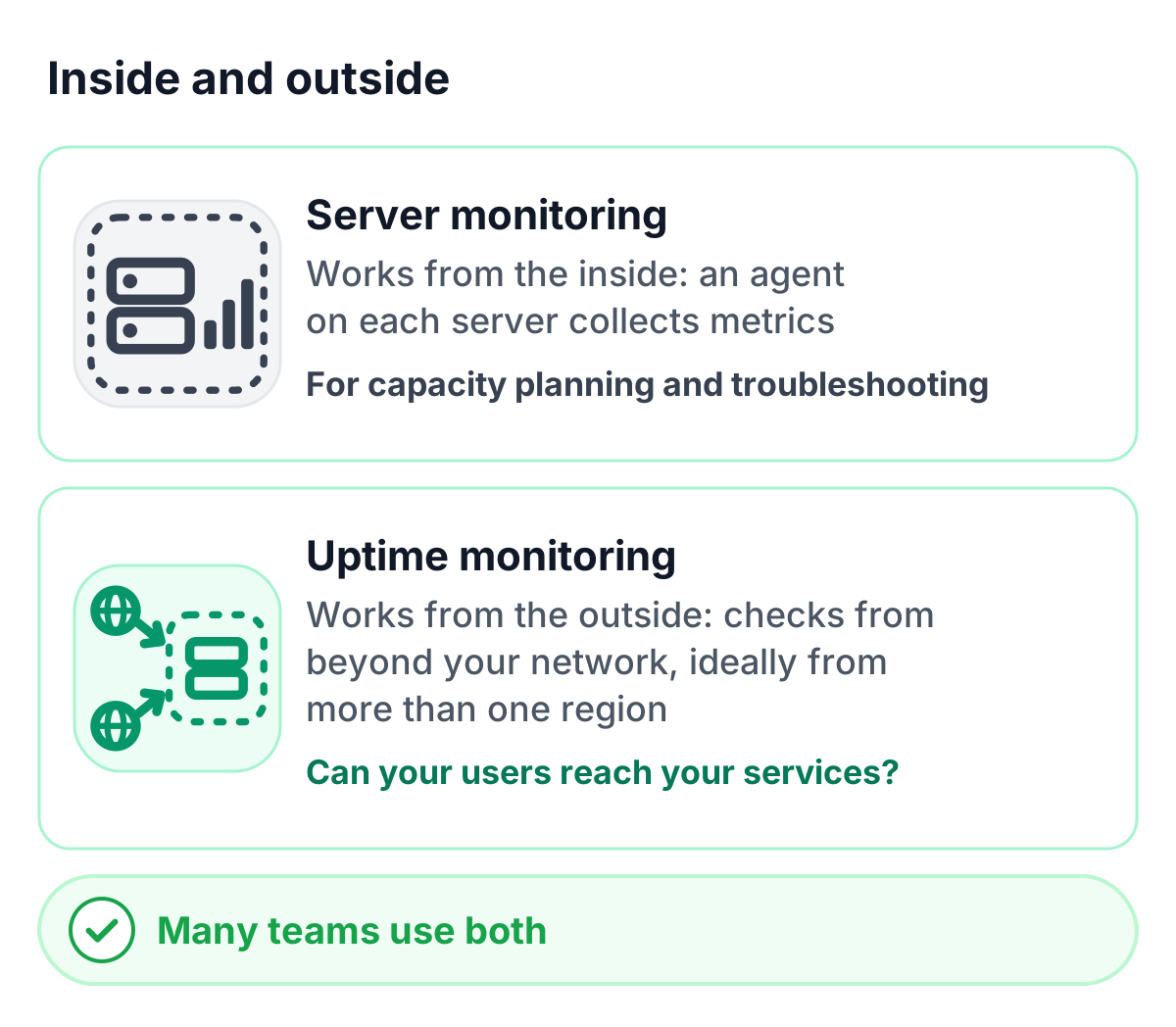
Server monitoring open source tools usually work from the inside: an agent on each server collects metrics such as CPU, memory, disk usage and process health. That is valuable for capacity planning and troubleshooting.
External uptime monitoring answers a different question: whether your users can reach your services. The two complement each other. Many teams combine internal metrics with external availability checks.
Self-hosted vs hosted: a comparison
| Criterion | Self-hosted open source | Hosted service |
|---|---|---|
| Setup | Install, configure and secure the software | Create an account and add monitors |
| Independence | Requires separate infrastructure you operate | Runs on the provider’s infrastructure, separate from yours |
| Check locations | Wherever you deploy probes | The provider’s locations |
| Notifications | Connect your own email and SMS providers | Included or available as add-ons |
| Updates and security | Your team patches and upgrades | Handled by the provider |
| Data control | Full control over storage and location | Defined by the provider and its data processing agreement |
| Costs | No license fee; hosting and team time | Subscription; operations included |
| Support | Community and your own team | Provider support |
When an open source status page is a good fit
- Your team already runs infrastructure on several independent providers or regions.
- You need deep customization or want to extend the code.
- You want every byte of data on systems you operate.
- You have the capacity to own updates, security and on-call for the monitoring itself.
When a hosted status page is the better fit
- You want your team’s time on your product, not on running the monitoring.
- You need checks from several continents without operating probes.
- You want SMS, voice and chat notifications, subscribers and branding ready to use.
- You need compliance documentation, such as a data processing agreement, without building it yourself.
How to choose: questions to ask
The best open source status page, or the best hosted one, is the one that matches your answers to these questions:
- Will the status page stay reachable when your main infrastructure has a problem?
- From which locations do you need to check your services?
- Who updates and secures the software, and how quickly?
- Which notification channels do your customers and your on-call team need?
- Where must your monitoring and subscriber data be stored, and how do you document it for GDPR?
- What does the total cost look like once team time is included?
TrustComponent Monitoring: hosted, in the EU
TrustComponent Monitoring is a hosted service, not an open source project, built for teams that want monitoring and status pages without running them:
- Uptime, website and API monitoring with 16 check types, as often as every 30 seconds, from multiple locations
- Hosted status pages with custom domains, branding, 10 languages and subscribers
- Alerts in 16 channels with escalation chains, plus incident communication and uptime reports
- Data stored and processed in the EU, with a GDPR data processing agreement you can sign online
Conclusion
Open source and self-hosted status pages give you control; hosted services give you time. If your team has the infrastructure and capacity to run monitoring independently, self-hosting can be a good fit. If you want independent, multi-region monitoring and status pages that are ready in minutes, a hosted service is the faster path.
Get started
👉 Try TrustComponent Monitoring for free with a free plan that includes a status page.