

Introduction
A VPN (Virtual Private Network) is one of the most widely used tools for security and privacy on the internet. With a VPN, users can protect their data, hide their IP address and get around geographical restrictions. To use one well, it helps to know how a VPN works, where its limits are and what to look for in a provider. There is also a side that VPN guides rarely mention: attackers misuse VPNs against websites.
What is a VPN and why is it important?
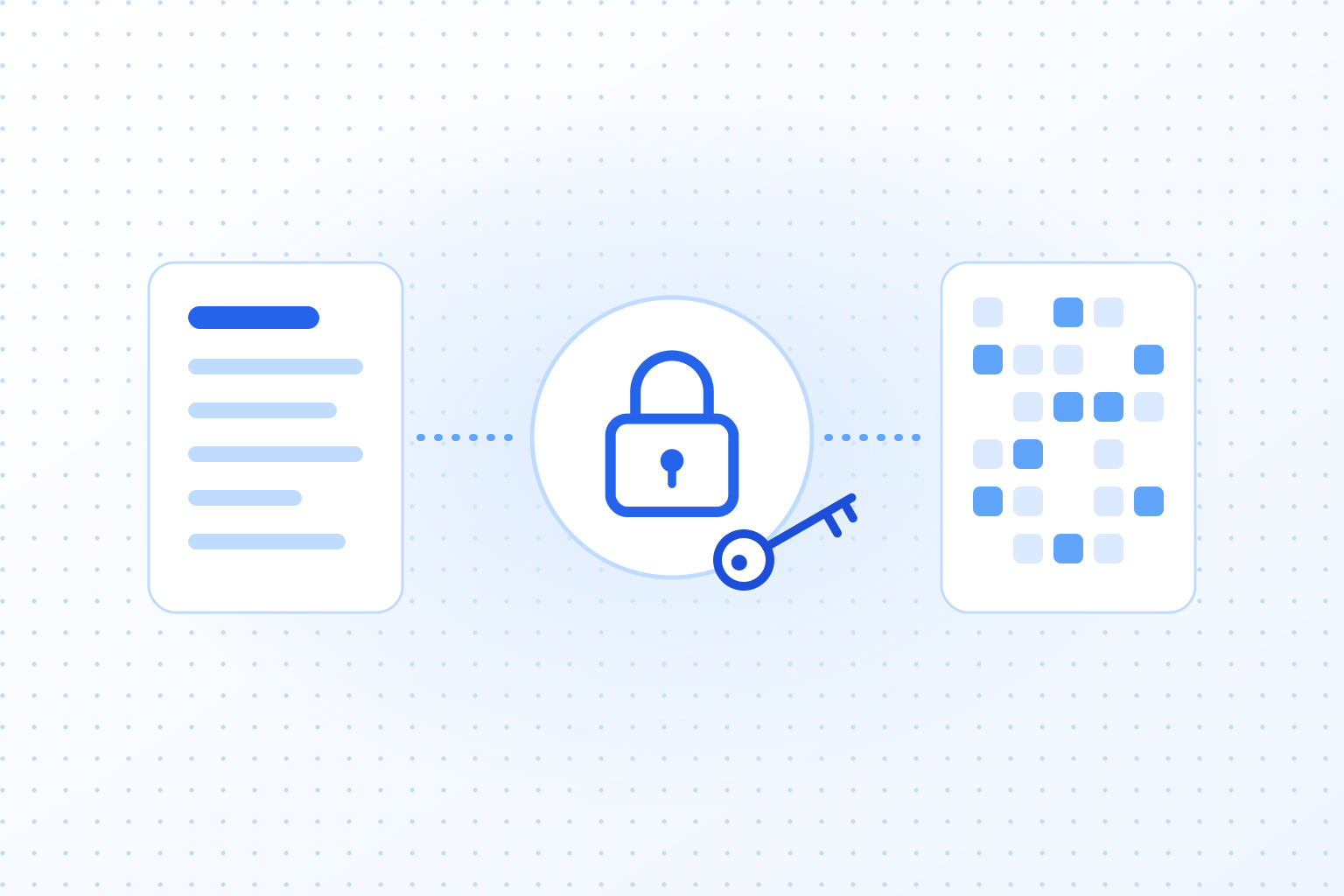
A VPN, short for “virtual private network,” lets you set up a private, secure connection to another network over a public network such as the internet. It hides your IP address and encrypts all data you send, which protects your privacy and makes attacks harder.
VPNs were first built so that companies could give remote employees a secure connection to the company network. Today, millions of individuals use them as well, to browse securely, reach restricted content or keep their data away from prying eyes. Governments, internet providers and large tech companies collect more data than ever, and that is one reason the interest keeps growing.
Using a VPN is simple: you install an app, pick a server and connect. It is most useful in a café, on hotel Wi-Fi or when you want to stream content from another country.
How does a VPN work technically?
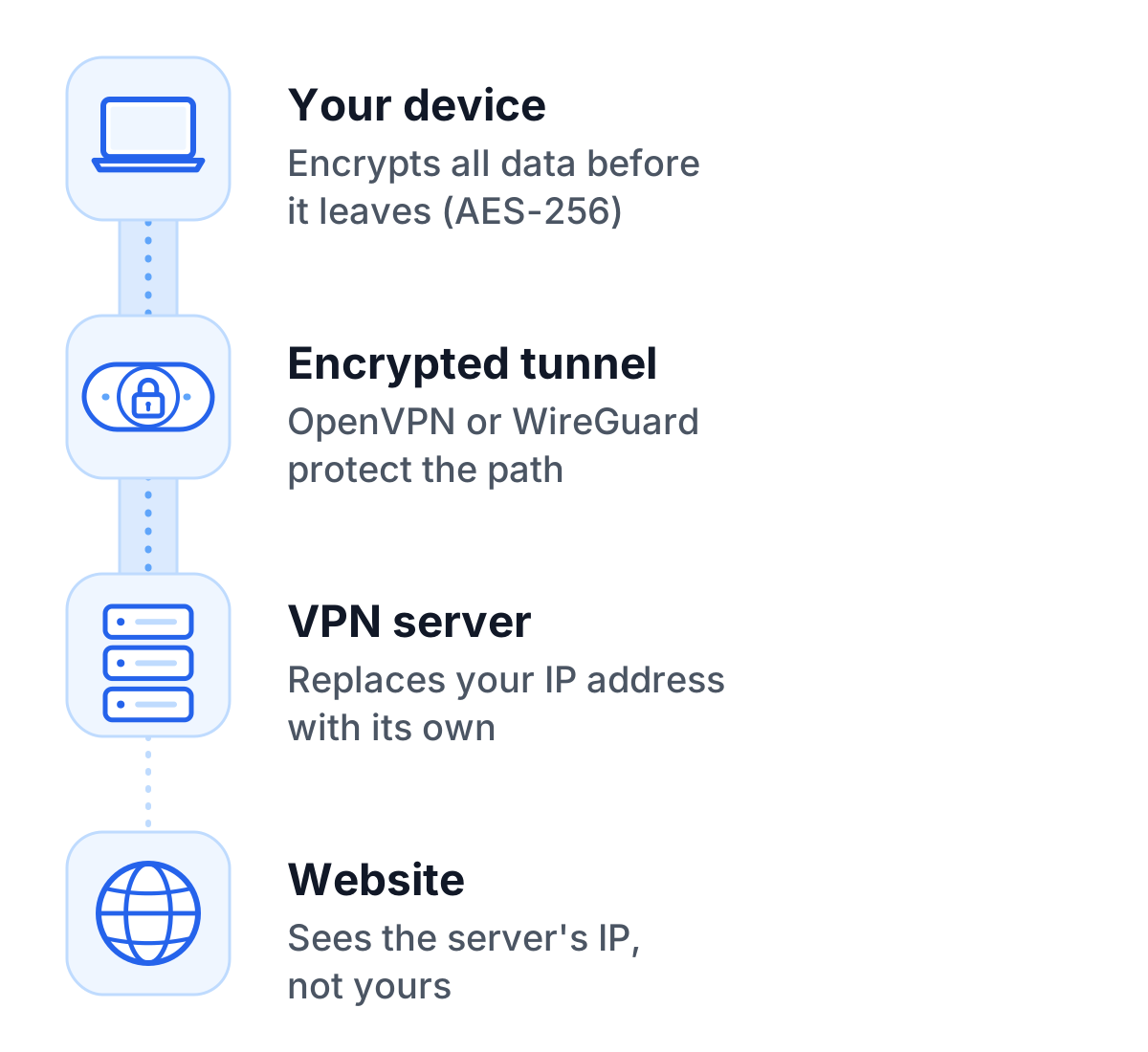
Technically, a VPN works by combining three things: encryption, tunneling and IP masking.
Encryption and security
Once the connection to a VPN server is up, all data is encrypted before it leaves the device. VPNs use modern standards such as AES-256, which the military and banks also use. Even if an attacker intercepts the data, it would be unreadable without the appropriate key.
Tunneling
Tunneling refers to the protected pathway that data travels between your device and the VPN server. Protocols such as OpenVPN or WireGuard set up this tunnel and keep it stable. Without the tunnel, data could be read or changed on its way.
IP masking
The best-known feature of a VPN is that it replaces your real IP address with that of the VPN server. Websites and other parties can then no longer tell your location or identity from your IP address. It also allows you to bypass geographical restrictions, such as those imposed by streaming services or government censorship.
The diverse applications of a VPN
Privacy is only one reason to use a VPN. Here are the most common ones, at home, at work and on the road.
Security in public networks
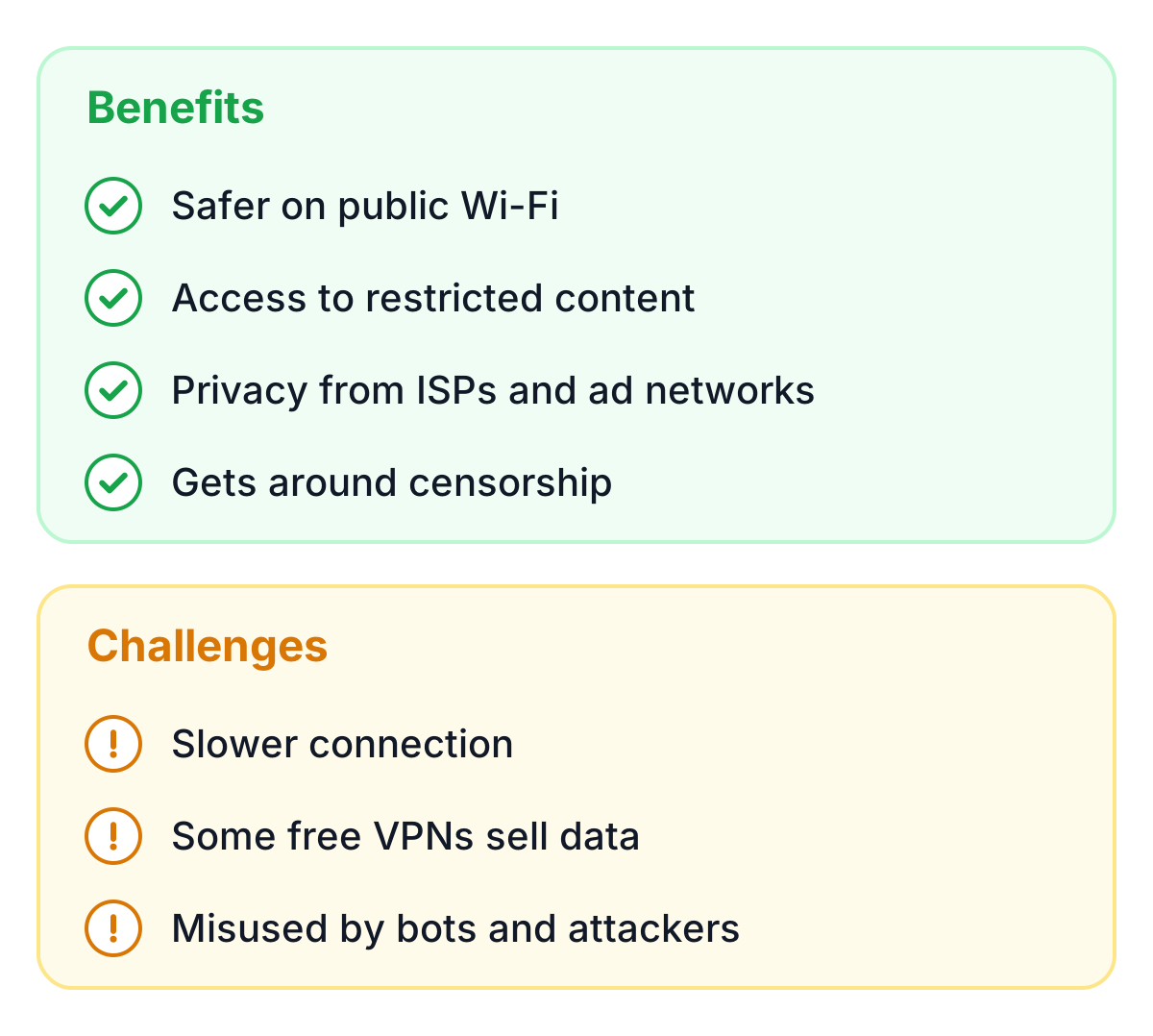
Public Wi-Fi networks are often insecure and a common target for hackers. A VPN encrypts your connection and protects sensitive data such as passwords, emails, and credit card information from theft.
Unrestricted access to content
A lot of online content is geographically restricted, especially on streaming services that limit their catalog to certain countries. A VPN allows you to bypass these restrictions by virtually placing yourself in another location. This is especially useful for travelers or expatriates.
Privacy and anonymity
A VPN makes it much harder for ISPs, ad networks or government agencies to track your online activities. Your browsing is more anonymous, and less of your data ends up in personalized advertising or surveillance.
Bypassing censorship
In some countries, access to certain websites or social media is blocked by government censorship. A VPN enables you to bypass such restrictions and freely consume information.
Advantages and challenges of VPNs
A VPN helps in many situations, but it has drawbacks you should know about.
Advantages
A VPN’s main strengths are better security, more privacy and access to content from around the world. It is most useful for people who often use insecure networks or care a lot about anonymity.
Challenges
VPNs can slow down internet speeds since all data is routed through an additional server. Providers also differ a lot in quality. Good providers respect your privacy, while some free VPNs sell your data or skimp on security.
Attackers misuse VPNs too, which is a real problem for website operators. The section on misuse below explains what that means and how websites deal with it.
Choosing the right VPN provider
When you choose a VPN, start with privacy: the provider should keep no usage logs. A wide choice of server locations also helps if you want to reach content from different regions.
Free VPNs are tempting, but they often come with limited bandwidth, weaker security and questionable privacy policies. If you rely on a VPN regularly, a trustworthy paid provider is usually worth the money.
Misuse of VPNs and modern security solutions
Most people use VPNs for legitimate reasons such as privacy and security, but attackers use them as well, to mask their IP address while attacking websites or networks. Blocking all VPN traffic is not the answer: plenty of real visitors use a VPN at work or while traveling. A better approach is to judge each request on its own, which is what modern bot detection does. TrustCaptcha uses a proof-of-work that costs computing time whichever IP address a request comes from, plus a bot score, so a visitor on a VPN can still send a form, while mass automated requests become expensive. Website operators get more security without making things harder for legitimate users.
Conclusion
A VPN works by encrypting your traffic, sending it through a tunnel and showing websites the server’s IP address instead of yours. That protects you on public Wi-Fi, makes tracking harder and gets you past many geographical restrictions. It does not make you fully anonymous, because cookies and browser data can still identify you.
The provider matters more than the technology: no logs, a clear privacy policy and, for regular use, a paid plan. If you run a website, remember that the same technology hides attackers too, so check requests by their behavior and cost, not only by their IP address.
'/%3e%3c/mask%3e%3cradialGradient%20id='glow'%20cx='0.5'%20cy='0.5'%20r='0.5'%3e%3cstop%20offset='0'%20stop-color='%23dbeafe'%20stop-opacity='0.95'/%3e%3cstop%20offset='1'%20stop-color='%23dbeafe'%20stop-opacity='0'/%3e%3c/radialGradient%3e%3c/defs%3e%3crect%20width='1536'%20height='1024'%20fill='url(%23bg)'/%3e%3crect%20width='1536'%20height='1024'%20fill='url(%23dots)'%20mask='url(%23dotmask)'/%3e%3cellipse%20cx='768'%20cy='512'%20rx='640'%20ry='420'%20fill='url(%23glow)'/%3e%3cpath%20d='M460%20520%20H618'%20stroke='%232563eb'%20stroke-width='8'%20stroke-linecap='round'/%3e%3cpath%20d='M596.9%20531.5%20L618%20520%20L596.9%20508.5'%20fill='none'%20stroke='%232563eb'%20stroke-width='7'%20stroke-linecap='round'%20stroke-linejoin='round'/%3e%3cpath%20d='M918%20520%20H1066'%20stroke='%2360a5fa'%20stroke-width='8'%20stroke-dasharray='4%2018'%20stroke-linecap='round'/%3e%3cpath%20d='M1044.9%20531.5%20L1066%20520%20L1044.9%20508.5'%20fill='none'%20stroke='%2360a5fa'%20stroke-width='7'%20stroke-linecap='round'%20stroke-linejoin='round'/%3e%3crect%20x='210'%20y='400'%20width='240'%20height='240'%20rx='40'%20fill='%23ffffff'%20stroke='%23bfdbfe'%20stroke-width='3'%20filter='url(%23shadow)'/%3e%3crect%20x='265.0'%20y='469.7'%20width='130'%20height='80.6'%20rx='7.8'%20fill='%23ffffff'%20stroke='%232563eb'%20stroke-width='7'/%3e%3cpath%20d='M249.4%20557.3%20h161.2'%20stroke='%232563eb'%20stroke-width='9.1'%20stroke-linecap='round'/%3e%3crect%20x='255'%20y='290'%20width='150'%20height='56'%20rx='28'%20fill='%23eff6ff'%20stroke='%232563eb'%20stroke-width='4'/%3e%3ccircle%20cx='285'%20cy='318'%20r='10'%20fill='%232563eb'/%3e%3crect%20x='309'%20y='312'%20width='70'%20height='12'%20rx='6'%20fill='%232563eb'%20opacity='0.55'/%3e%3ccircle%20cx='768'%20cy='520'%20r='140'%20fill='%23ffffff'%20stroke='%232563eb'%20stroke-width='8'%20filter='url(%23shadow)'/%3e%3ccircle%20cx='768'%20cy='520'%20r='110'%20fill='%23eff6ff'/%3e%3cpath%20d='M693.0%20501.1%20C723.0%20475.9%20813.0%20475.9%20843.0%20501.1%20C843.0%20551.5%20798.0%20564.1%20777.0%20532.6%20Q768%20520%20759.0%20532.6%20C738.0%20564.1%20693.0%20551.5%20693.0%20501.1%20Z'%20fill='%23ffffff'%20stroke='%232563eb'%20stroke-width='7'%20stroke-linejoin='round'/%3e%3cellipse%20cx='735.0'%20cy='516.22'%20rx='15.0'%20ry='10.08'%20fill='%232563eb'/%3e%3cellipse%20cx='801.0'%20cy='516.22'%20rx='15.0'%20ry='10.08'%20fill='%232563eb'/%3e%3crect%20x='1086'%20y='400'%20width='240'%20height='240'%20rx='40'%20fill='%23ffffff'%20stroke='%23bfdbfe'%20stroke-width='3'%20filter='url(%23shadow)'/%3e%3ccircle%20cx='1206'%20cy='520'%20r='70'%20fill='%23ffffff'%20stroke='%232563eb'%20stroke-width='7'/%3e%3cpath%20d='M1136%20520%20h140%20M1206%20450%20c-42.0%2042.0%20-42.0%2098.0%200%20140%20M1206%20450%20c42.0%2042.0%2042.0%2098.0%200%20140'%20fill='none'%20stroke='%232563eb'%20stroke-width='5.6000000000000005'/%3e%3crect%20x='1131'%20y='290'%20width='150'%20height='56'%20rx='28'%20fill='%23f3f4f6'%20stroke='%239ca3af'%20stroke-width='4'/%3e%3ccircle%20cx='1161'%20cy='318'%20r='10'%20fill='%239ca3af'/%3e%3crect%20x='1185'%20y='312'%20width='70'%20height='12'%20rx='6'%20fill='%239ca3af'%20opacity='0.55'/%3e%3cpath%20d='M422%20318%20C%20530%20240%20648%20230%20728%20370'%20fill='none'%20stroke='%2360a5fa'%20stroke-width='5'%20stroke-dasharray='3%2014'%20stroke-linecap='round'/%3e%3cpath%20d='M710.9%20359.6%20L728%20370%20L727.5%20350.0'%20fill='none'%20stroke='%2360a5fa'%20stroke-width='6'%20stroke-linecap='round'%20stroke-linejoin='round'/%3e%3c/svg%3e)