

Introduction
Firewalls are among the oldest tools in IT security and still among the most important. A firewall keeps unwanted connections out of a network, and it can also stop data from leaving it and close internal gaps. Knowing what a firewall does and which types exist shows how it helps against attacks such as DDoS or unauthorized access.
What is a firewall? Basics and definition
A firewall is a security barrier that controls traffic between networks. It decides based on predefined rules whether data packets are allowed or blocked. These rules are based on parameters such as IP addresses, ports, and protocols. The term “firewall” originally comes from the construction industry, where a fireproof wall is used to prevent the spread of fires. The picture fits: a firewall in IT stops a problem in one network from spreading into another.
The first firewalls were developed in the 1980s, when companies began connecting their networks to each other. These early systems were simple packet filters that worked at the network level. Modern firewalls work at several layers of the ISO/OSI model, which lets them detect more sophisticated attacks as well.
Key functions of a firewall include:
- Blocking unauthorized access to networks.
- Protection against malware by filtering malicious data packets.
- Logging and analyzing network activities.
- Monitoring applications and user activities.
Types of firewalls: hardware, software, and cloud solutions
Hardware firewalls
Hardware firewalls are standalone devices positioned between an internal network and the internet. They offer high performance and are particularly suitable for companies with large networks. Well-known manufacturers like Cisco and Fortinet provide specialized devices that can analyze traffic in real time. Their advantages lie in their reliability and independence from operating systems.
Software firewalls
In contrast, software firewalls run on individual devices or servers. Examples include the Windows Defender Firewall and the firewalls built into Linux and macOS. They offer flexibility and are often more cost-effective than hardware firewalls. They are ideal for small businesses and individual users, as they are easy to configure and adapt to specific requirements. Open-source solutions such as pfSense sit in between: they turn an ordinary computer into a dedicated firewall for a whole network.
Advantages of software firewalls:
- Lower cost compared to hardware solutions.
- Customizability through user-defined rules.
- Easy integration into existing systems.
Cloud-based firewalls
As more IT infrastructure moves to the cloud, cloud-based firewalls are becoming more common. They protect hybrid environments and scale without any physical devices. Because they can handle large amounts of traffic, they work well against DDoS attacks.
Inbound and outbound rules: controlling traffic
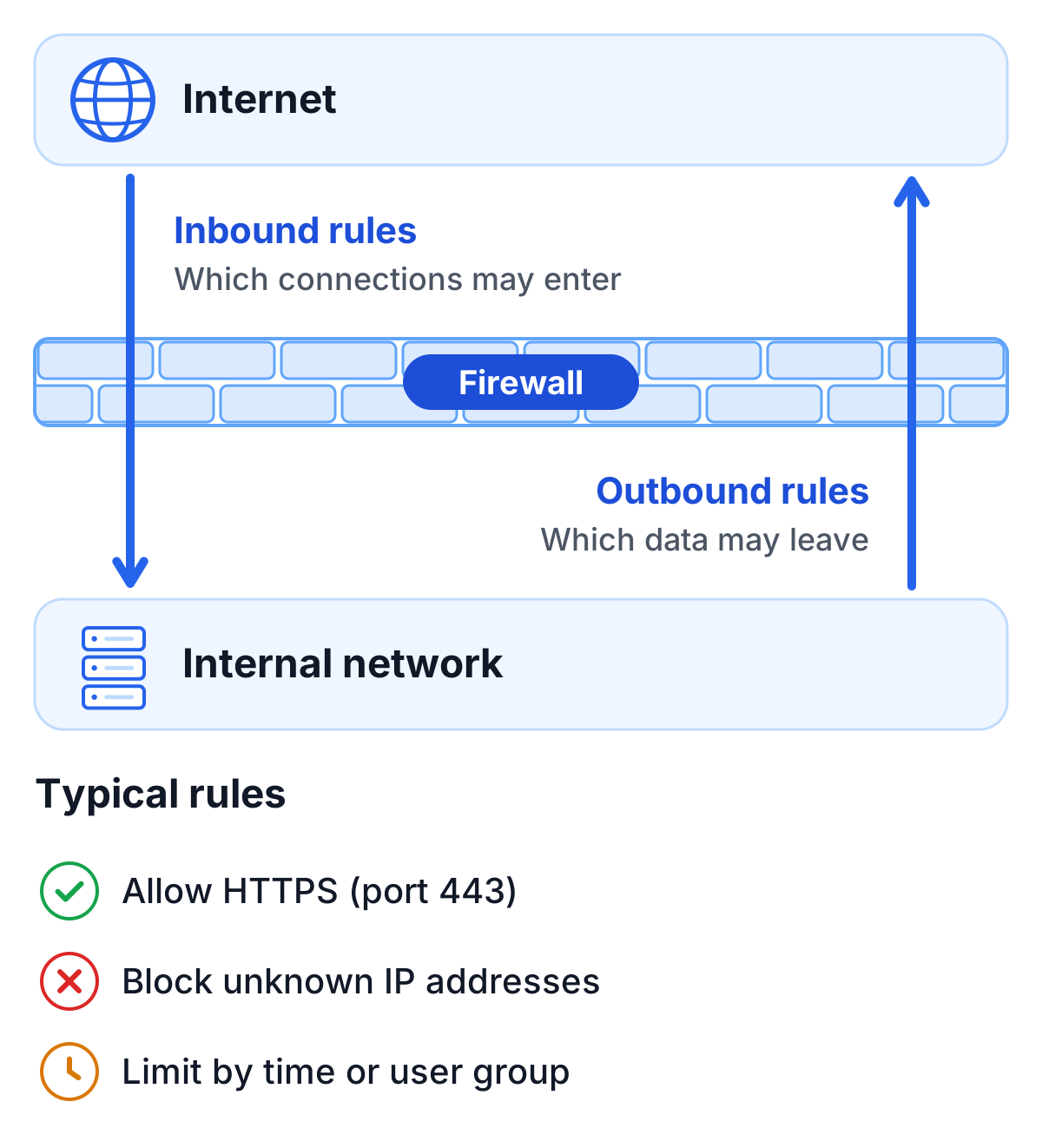
Controlling traffic is the firewall’s main job. To do this, it uses rules for inbound and outbound connections:
- Inbound rules: determine which external connections are allowed to access an internal network. This prevents unauthorized access and protects against threats such as malware infections.
- Outbound rules: regulate which data is allowed to leave the network. This is particularly important for preventing the leakage of sensitive information.
An example of such rules in practice is protecting servers that store sensitive data. Administrators can allow access only to specific IP addresses while preventing internal users from accessing insecure websites.
Typical firewall rules include:
- Allowing HTTPS connections (Port 443) for secure internet access.
- Blocking all unknown or unauthorized IP addresses.
- Restricting connections based on time of day or user groups.
Firewalls and ISO/OSI layers: multidimensional security
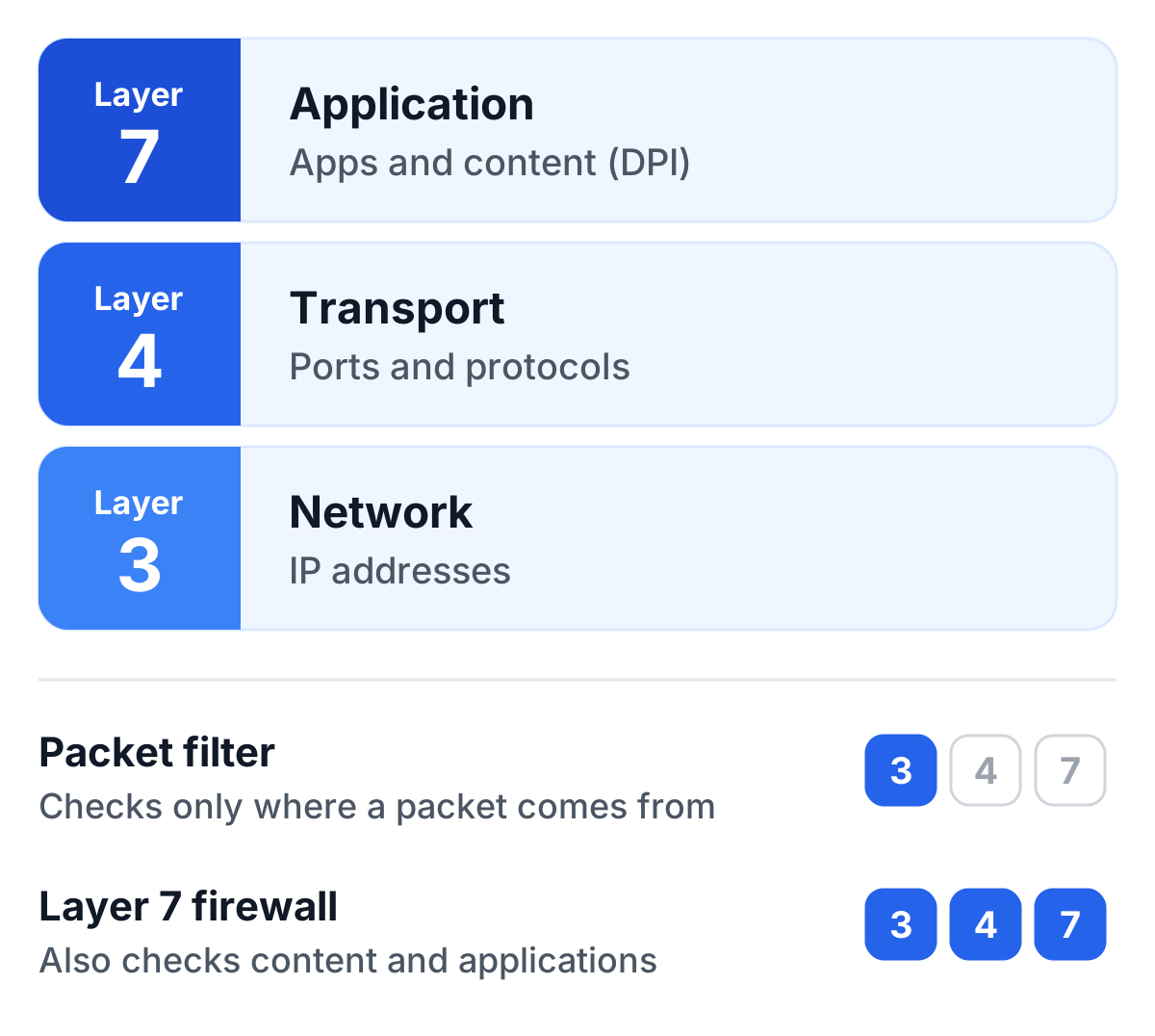
Firewalls operate at several layers of the ISO/OSI reference model. At the network layer (Layer 3), they filter data packets based on IP addresses. At the transport layer (Layer 4), they analyze ports and protocols, while at the application layer (Layer 7), they monitor specific applications and content.
An example of Layer-7 security is “Deep Packet Inspection” (DPI). With this technology, firewalls can analyze data packets down to the application level, making them particularly effective against complex attacks such as SQL injections or phishing.
Working on several layers means a firewall can catch attacks at different levels. While a basic packet filter firewall only checks the origin of a data packet, a modern Layer-7 firewall can also analyze the type of content and applications and block malicious actions.
Protection against DDoS attacks: the firewall as a line of defense
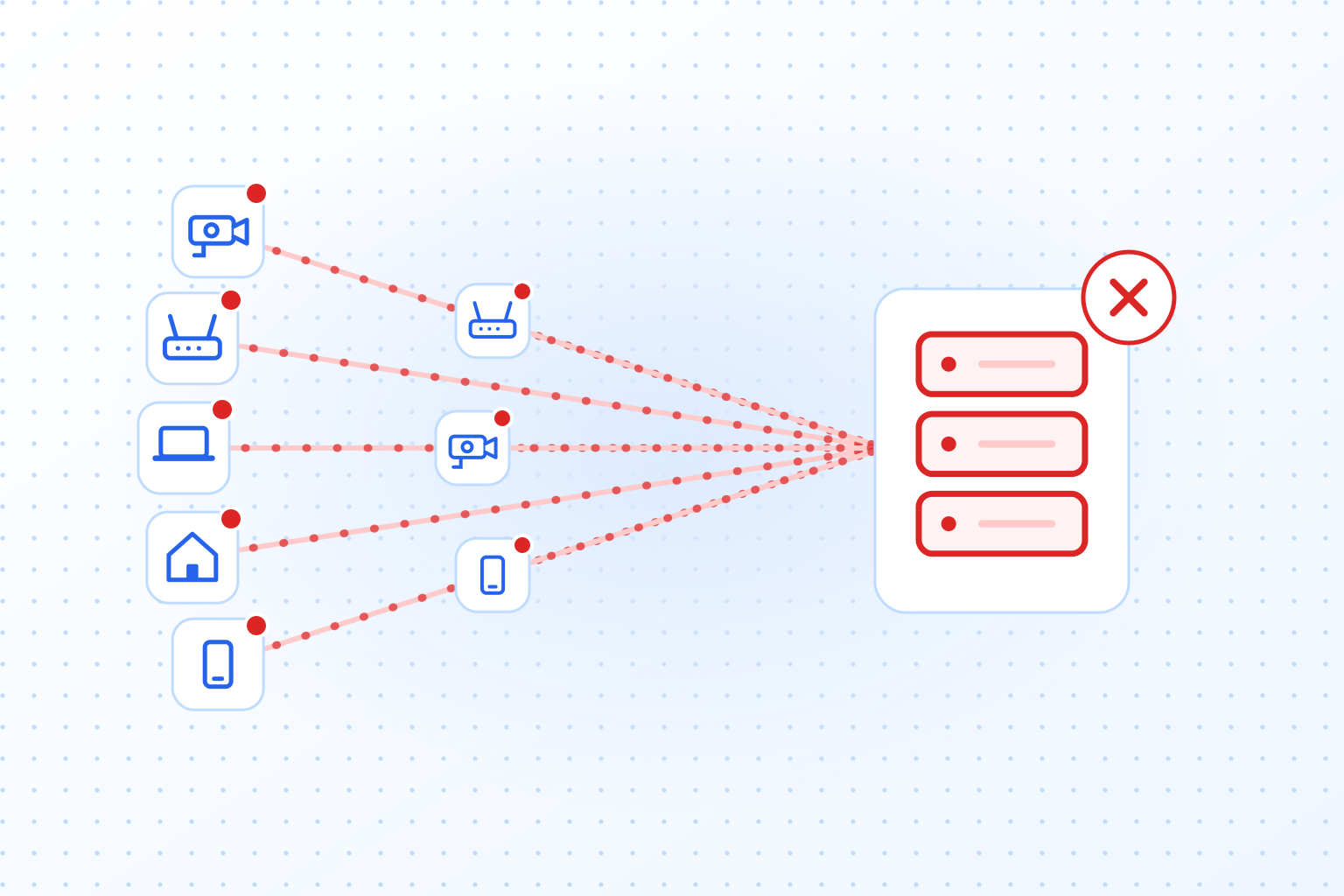
DDoS attacks (Distributed Denial of Service) aim to overwhelm networks with massive traffic. A modern firewall can absorb part of such an attack. It detects unusual traffic and blocks suspicious IP addresses in real time. Mechanisms like rate limiting and connection timeouts can mitigate attacks before they cause damage. Bots that send ordinary-looking requests from many IP addresses are harder to catch this way, which is where bot detection on the website itself comes in.
In practice, it can look like this: within seconds, thousands of connections arrive from addresses that have never visited before. The firewall spots the pattern, throttles those sources and keeps serving regular users.
Firewall strategies for DDoS defense:
- Using IP blacklists for known attackers.
- Limiting concurrent connections per user.
- Prioritizing legitimate data packets within the network.
Conclusion: why firewalls are important
A firewall decides which connections may enter or leave a network, and most other security measures build on that decision. It works alongside antivirus programs and VPNs rather than replacing them. With attacks getting more complex, running a network without a well-configured firewall is hard to justify.
Still, even the best firewall is not a security strategy on its own. Regular updates, trained staff and additional systems such as intrusion detection systems (IDS) keep a network secure over time.
'/%3e%3c/mask%3e%3cradialGradient%20id='glow'%20cx='0.5'%20cy='0.5'%20r='0.5'%3e%3cstop%20offset='0'%20stop-color='%23dbeafe'%20stop-opacity='0.95'/%3e%3cstop%20offset='1'%20stop-color='%23dbeafe'%20stop-opacity='0'/%3e%3c/radialGradient%3e%3c/defs%3e%3crect%20width='1536'%20height='1024'%20fill='url(%23bg)'/%3e%3crect%20width='1536'%20height='1024'%20fill='url(%23dots)'%20mask='url(%23dotmask)'/%3e%3cellipse%20cx='768'%20cy='512'%20rx='640'%20ry='420'%20fill='url(%23glow)'/%3e%3cpath%20d='M460%20520%20H618'%20stroke='%232563eb'%20stroke-width='8'%20stroke-linecap='round'/%3e%3cpath%20d='M596.9%20531.5%20L618%20520%20L596.9%20508.5'%20fill='none'%20stroke='%232563eb'%20stroke-width='7'%20stroke-linecap='round'%20stroke-linejoin='round'/%3e%3cpath%20d='M918%20520%20H1066'%20stroke='%2360a5fa'%20stroke-width='8'%20stroke-dasharray='4%2018'%20stroke-linecap='round'/%3e%3cpath%20d='M1044.9%20531.5%20L1066%20520%20L1044.9%20508.5'%20fill='none'%20stroke='%2360a5fa'%20stroke-width='7'%20stroke-linecap='round'%20stroke-linejoin='round'/%3e%3crect%20x='210'%20y='400'%20width='240'%20height='240'%20rx='40'%20fill='%23ffffff'%20stroke='%23bfdbfe'%20stroke-width='3'%20filter='url(%23shadow)'/%3e%3crect%20x='265.0'%20y='469.7'%20width='130'%20height='80.6'%20rx='7.8'%20fill='%23ffffff'%20stroke='%232563eb'%20stroke-width='7'/%3e%3cpath%20d='M249.4%20557.3%20h161.2'%20stroke='%232563eb'%20stroke-width='9.1'%20stroke-linecap='round'/%3e%3crect%20x='255'%20y='290'%20width='150'%20height='56'%20rx='28'%20fill='%23eff6ff'%20stroke='%232563eb'%20stroke-width='4'/%3e%3ccircle%20cx='285'%20cy='318'%20r='10'%20fill='%232563eb'/%3e%3crect%20x='309'%20y='312'%20width='70'%20height='12'%20rx='6'%20fill='%232563eb'%20opacity='0.55'/%3e%3ccircle%20cx='768'%20cy='520'%20r='140'%20fill='%23ffffff'%20stroke='%232563eb'%20stroke-width='8'%20filter='url(%23shadow)'/%3e%3ccircle%20cx='768'%20cy='520'%20r='110'%20fill='%23eff6ff'/%3e%3cpath%20d='M693.0%20501.1%20C723.0%20475.9%20813.0%20475.9%20843.0%20501.1%20C843.0%20551.5%20798.0%20564.1%20777.0%20532.6%20Q768%20520%20759.0%20532.6%20C738.0%20564.1%20693.0%20551.5%20693.0%20501.1%20Z'%20fill='%23ffffff'%20stroke='%232563eb'%20stroke-width='7'%20stroke-linejoin='round'/%3e%3cellipse%20cx='735.0'%20cy='516.22'%20rx='15.0'%20ry='10.08'%20fill='%232563eb'/%3e%3cellipse%20cx='801.0'%20cy='516.22'%20rx='15.0'%20ry='10.08'%20fill='%232563eb'/%3e%3crect%20x='1086'%20y='400'%20width='240'%20height='240'%20rx='40'%20fill='%23ffffff'%20stroke='%23bfdbfe'%20stroke-width='3'%20filter='url(%23shadow)'/%3e%3ccircle%20cx='1206'%20cy='520'%20r='70'%20fill='%23ffffff'%20stroke='%232563eb'%20stroke-width='7'/%3e%3cpath%20d='M1136%20520%20h140%20M1206%20450%20c-42.0%2042.0%20-42.0%2098.0%200%20140%20M1206%20450%20c42.0%2042.0%2042.0%2098.0%200%20140'%20fill='none'%20stroke='%232563eb'%20stroke-width='5.6000000000000005'/%3e%3crect%20x='1131'%20y='290'%20width='150'%20height='56'%20rx='28'%20fill='%23f3f4f6'%20stroke='%239ca3af'%20stroke-width='4'/%3e%3ccircle%20cx='1161'%20cy='318'%20r='10'%20fill='%239ca3af'/%3e%3crect%20x='1185'%20y='312'%20width='70'%20height='12'%20rx='6'%20fill='%239ca3af'%20opacity='0.55'/%3e%3cpath%20d='M422%20318%20C%20530%20240%20648%20230%20728%20370'%20fill='none'%20stroke='%2360a5fa'%20stroke-width='5'%20stroke-dasharray='3%2014'%20stroke-linecap='round'/%3e%3cpath%20d='M710.9%20359.6%20L728%20370%20L727.5%20350.0'%20fill='none'%20stroke='%2360a5fa'%20stroke-width='6'%20stroke-linecap='round'%20stroke-linejoin='round'/%3e%3c/svg%3e)